Azure – Protect My App

If you’ve taken a path to adopt public cloud and part of that adoption is a public facing application, you need to review how you are protecting it within Azure. When your application was on-premises, there was most likely only a single well managed solution to granting external access. In Azure, there are several various solutions available and each carries its own set of functionality and risk.

Rather than try define that entire list, let us look at how best to protect your application, regardless of how you have deployed it. With Azure, these are my three preferred options:

  1. Azure AD Application Proxy
  2. Azure Application Gateway
  3. 3rd Party Network Virtual Appliance

These arguably run from least to most secure. An important tip is to treat each application as unique, because it is. There is not a single best solution for all of your applications and as Azure is a shared model of security it is up to you to protect your data!

Awkward stuff out of the way, let’s look at Application Proxy, we’ve already had a post on setting this up here. The key point with this service is that you do not have your site exposed externally at a network level. Of course, the application itself will be and therefore possibly your server and data, but there is not an open endpoint accepting traffic.

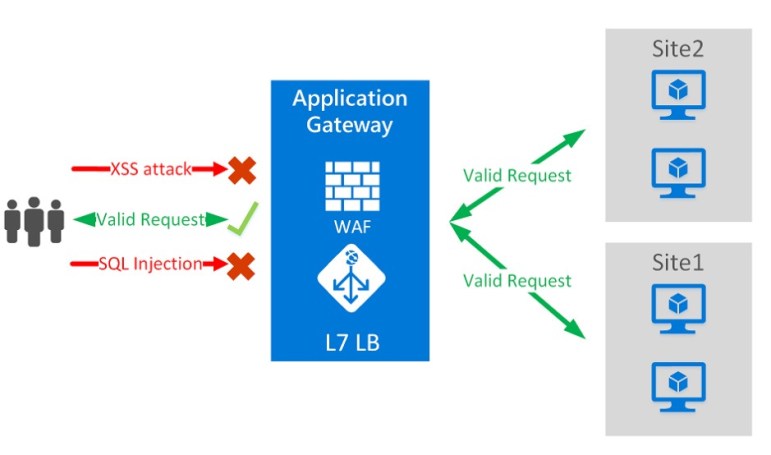
Next is Application Gateway. This is actually a load-balancing solution but you can enable the Web Application Firewall tier easily. This provides protection of your applications from common exploits and vulnerabilities. However, this protection is based on rules from the OWASP core rule set and while it is configurable, this only means you can disable certain rules, not add custom ones. Application Gateway can seamlessly integrate into your environment whether you are running PaaS or IaaS solutions and is economical from a cost perspective. However, that point regarding customisation can often be the deciding factor in choosing our third option instead.

Finally, a 3rd party appliance. Azure offers solutions from the majority of the major providers in this space. Easily deployable from the Azure Marketplace within minutes. Integration options are good but require some work, (See post on routing here) and cost can be a factor to meet required availability levels. But if you need maximum protection and customisation, this is your best option.

Overall, I think there is definitely a solution in Azure that will meet your requirements. Take the time to understand your application, consult with your SMEs and you won’t go wrong!


Azure Compute Updates at Ignite

If you thought there were a lot of networking updates at Microsoft Ignite, you won’t believe how many there were when it comes to Azure Compute. Here I will try to round-up those I am most excited about. Some of the features announced have been on a wish list of mine for quite a while…I’m looking at you Managed Disks!

First up, several new VM sizes have been announced. The ND and NV series has been updated in preview. This series offers powerful GPU capabilities and is now running cutting edge tech from NVIDIA.

HPC can often have several blockers on-premise but is easily workable in Azure, building on this, Microsoft have added two new ranges to the H series offering. HB an HC series will be in preview before the end of the year. These allow for staggering amounts of compute power and bandwidth.

Storage is sometimes overlooked when considering VM performance, that is something Microsoft are attempting to correct with the announcement of Ultra-SSD Managed Disks in preview. These disks will offer sub-millisecond latency, and can hit up to 160,000 iOPS on a single disk. There were no typos there, fastest disks available in any cloud.

Standard SSDs and larger sizes across the board were also announced. This allows greater flexibility in performance and cost management when designing and deploying solutions.

As mentioned earlier, my wish list item, Managed Disks can now be moved between resource groups and subscriptions. This finally allows better management and flexibility with deployments. This update allows you to also move managed images and snapshots. We had access to the private preview of this functionality and it works exactly as expected.

Not directly Compute, but important in relation to it is the announcement of Windows Virtual Desktop. Azure is already the only cloud where you can run Windows 10 workloads and this service is going to improve on the deployment and management of them. Essentially, Azure will run the RDS Gateway and Broker service for you. You will have full control and responsibility of the infrastructure this will connect too and which applications and desktops are presented. We’ve chatted to the Product Team here at Ignite and they are excited for people to get their hands on the preview and really test it out. My favourite piece of functionality is that the service will be agent-less when using Windows 10 to connect which should make deployment and adoption as painless as possible for admins!

Finally, to encourage older workload migration, Microsoft announced that if you migrate Windows Server or SQL Server 2008/R2 to Azure, you will get three years of free extended security updates on those systems. This could save you some money when Windows Server and SQL Server 2008/ R2 end of support (EOS).

So many announcements, so little time. Expect more detailed posts on most if not all of the above piece over the coming weeks and months.

Azure Networking Updates at Ignite

To say there have been a lot of Azure announcements at Ignite is an understatement. Several important services have hit GA and several exciting new services have been announced. Rather than re-list them all (I’ll link through at the end), I am going to highlight those I am most excited about, and think will be relevant to most clients.

Below is a graphical overview of the new approach to Azure networking, which contains four pillars, Connect, Protect, Deliver and Monitor.

azurenetworkingfalludpate

Starting with Connect, two ExpressRoute related announcements immediately grabbed my attention. Microsoft now offer 100Gbps connectivity speeds via ExpressRoute Direct which is the fastest cloud connectivity available.

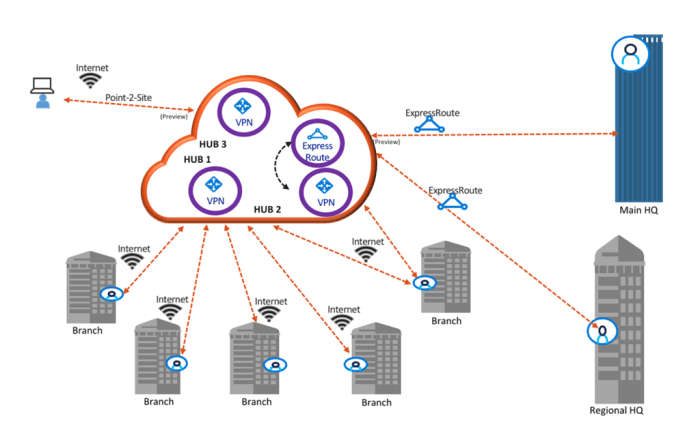
Helping customers with geo-distributed offices, ExpressRoute Global Reach was announced, allowing customers to connect offices using their existing circuits. Additional to this concept, Azure Virtual WAN is now GA. With that move, Microsoft also added new preview features including P2S VPN and ExpressRoute connectivity shown below:

vwanfeatures.png

The final announcement in Connect that really will make a difference to clients is Public IP Prefix. This means that you can now request a range of static IP addresses for your resources that you will “own”. This will make white-listing and administration of your public presence a lot simpler.

Moving to the Protect pillar, Azure Firewall has now moved to GA. Which is a great service for those looking to have control over their breakout point in Azure without deploying and maintaining an NVA.

Rounding out Protect, Service Endpoint Policies. These allow more granular control over access to Azure resources over your vnet service endpoint. See previous post on endpoints for more.

From the Deliver pillar, the announcement of Azure Front Door in preview is the big one. AFD is a global entry point for you applications that is scalable and secure. The ability to scale and level of integration with existing services will make this widely used by customers with a large public facing presence.

There are also updates to Application Gateway which improve performance, introduce redundancy and increase the level of integration with over services.

From the final pillar, Monitor, the main announcement is Virtual Network TAP in preview. This allows for continuous mirroring of VM traffic to a collector, without any agents. This the first of these services in a public cloud and will allow for greater analytics and granularity of environment traffic.

For the entire round-up from Microsoft, head here.

Azure Certification Updates and Announcing Microsoft Learn

We’re lucky enough to be at Microsoft Ignite in Orlando this week. Trying to wrap all of the announcements into immediate reactions is almost impossible, so I’m going to take some time to give each announcement the detail it deserves. With that said, I think the best place to start is with learning and certification.

At Inspire, Microsoft announced new learning paths for Azure, see here for previous post. Yesterday, they confirmed the new certification options. Microsoft have shifted their certification focus to be role based. This was first seen with Azure Administrator certification and is continued with Developer and Architect tracks. Azure is the first technology platform Microsoft are making this change for, 365 will follow later this year.

One interesting point to take from the announcement is that there will no longer be an MCSA or MCSE qualification, there will be individual awards for each path. This is best explained in the diagram below:

Azure Apps and Infrastructure certs

So depending on your specific, or hopeful future, job role you have some options. As you can see in the bottom right hand corner, there are Transition exams available if you have previously sat the relevant Azure exams. I’ve already sat the AZ-102 beta exam, it was very good, everything you would expect from an Administrator perspective. I am going to attempt to sit the AZ-302 exam here at Ignite as well, so watch social for thoughts on that if there are no NDAs.

The second and more impressive announcement is the introduction of Microsoft Learn. This is an entirely new platform that allows you to interactively learn right in the browser. Want to know the best thing, it’s all FREE.

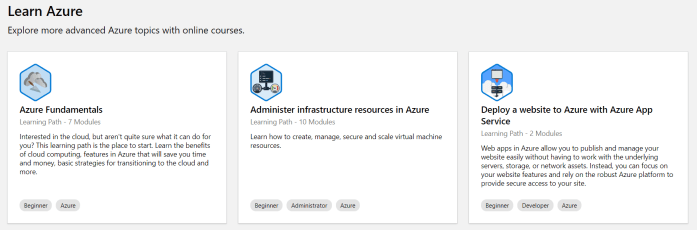
If you’re trying to learn more about Azure, or you are just starting, there is an absolute wealth of learning available. The paths are accurate and beneficial, they allow you to learn at your own pace and if you’re into achievements, they offer plenty! See below for an example of some of the paths offered:

learn azure.PNG

Part of the brilliance of the platform is direct cloud shell integration, allowing you to actually deploy and test what you are learning about, again right in the browser. Genuinely, I am loving this new Learn platform, I spent some time yesterday speaking to the product team and trying out different paths myself and the service is excellent. What are you waiting for, get over there and start learning now!

There are discount codes for the beta exams Architect track here and the Developer track here.

Understanding Azure Reserved Virtual Machine Instances

One of the main benefits of Azure’s billing model is that it offers per minute billing. This means that if you have an application/service/environment that isn’t required 24/7 you can reduce your costs by using Automation so that you will only pay for what you consume.

However, if your environment requires you run a VM constantly, the cost can start to mount up. To help alleviate this, Microsoft offer a solution in the form of long-term fixed price Virtual Machine instances.

These Reserved Instances (RI) help save money by allowing you to pre-pay for a one-year or three-year VM size. The fact that you pay up front, allows you to make significant savings on the Pay-As-You-Go pricing.

RIexample

The most common subscription offers have the ability to purchase RIs, but there are some restrictions in terms of how it is approached. The options are the below:

  • Enterprise agreement subscriptions. To purchase reservations in an enterprise enrollment, the enterprise administrator must enable reservation purchases in the EA portal.
  • Pay-As-You-Go but you must have the “Owner” role on the subscription to buy a reservation.
  • Cloud Solution Provider subscriptions. However, the providing partner must make the purchase on behalf of the customer.

Once purchased, the discount is then applied to the resource usage that matches up with the RI capacity purchased. For example, if you purchase a one-year RI for a DS4v3 size VM, and you are using a DS4v3 the discount will apply against that usage.

A good strategy is to determine the sizing before purchasing the RI. So my advice would be to run your VMs without an RI for a few months to ensure your sizing is suitable and therefore correct. However, if this is something that is proving difficult, there is a range of flexibility offered within your RI scope.

With instance size flexibility, you don’t have to deploy the exact same VM size to get the benefit of your purchased Azure Reserved Instances (RI) as other VM sizes within the same VM group also get the RI discount. As a rough example, see the below table from the Microsoft announcement.

VM name VM group Ratios

Standard_D2s_v3

DSv3 Series

1

Standard_D4s_v3

DSv3 Series

2

Standard_D8s_v3

DSv3 Series

4

Standard_D16s_v3

DSv3 Series

8

Standard_D32s_v3

DSv3 Series

16

Standard_D64s_v3

DSv3 Series

32

This means that if you buy an RI for a D2sV3, it would cover half of an D4sV3 instance etc. More on how this can be applied and options available to you are here.

In general, I think an RI purchase is something that most deployments should be taking advantage of. Once sized correctly and with the ability to leverage flexibility, there are huge savings to be made with relatively low amounts of administrative effort.

More on how to buy an RI here

More on how the discount is applied here