
One of the most common deployment, and as a result, design requirements in Azure, is Networking. Within all environments, not just Azure, Networking is critical. It is of upmost importance to get the design right, and get it right early.
However, if starting out on Azure, or potentially looking to progress to a more complex design based on requirements, Networking can be challenging. Not only is it a vast component of Azure, it has some of its own quirks in comparison to your on-prem environment. From experience, I have seen this lead to incorrect assumptions and frustration once a design is finally in use.
However, good design can obviously be somewhat subjective. For example, avoid discussing naming conventions for Azure on Twitter/X! (I joke…) But what can really help is to follow or at least begin with best practice. For Azure, this is thankfully centrally located for you on Docs. I know it’s called Learn now, but I will forever call it Docs – the difference it made to us all when it launched means it has my loyalty forever! Below is an image from Ignite 2018, where Docs was launched, and I spent more time than I’d like to admit winning one of those mascots. A mascot my small dog subsequently got hold of and made short work of unfortunately.

There is a wealth of information on the Azure Architecture Center, I’ve linked to Networking, but you can see there are many other sections covering all aspects of Azure. My new favourite indicator of content depth on Docs is the “Download PDF” button. For Networking alone, it is 257 pages!
Specific to Networking, it is broken into three sections:
- Explore ideas about
- Design Architectures
- Apply Guidance
Explore ideas about
Here is where you will find specific and complex concepts – for example Video capture and analytics for retail. These are meant to serve as both a start point and potentially a comparison solution/concept. Architects should use these as references and examples of what is possible.
Design Architectures
This is divided in two:
- Network Topology – Here you will find high-level architectures, example arrangements of network components and best practice guidance for knitting your network fabric together.
- Network Security – Same idea here, guidance and some specific Security scenarios.
Apply Guidance
This is the big section. It contains expansions and further guidance on the previous sections. This has some of the most useful guidance, whether you are starting out with Azure or not. One of the most useful articles for me is Network Level Segmentation.

This article helps form your understanding and design for nearly all other patterns. It’s crucial to good network design on Azure.
The other article I would recommend or even go as far as to suggest it as required reading is Spoke-to-spoke networking. Everything you need for Virtual Network design is covered in these two articles.
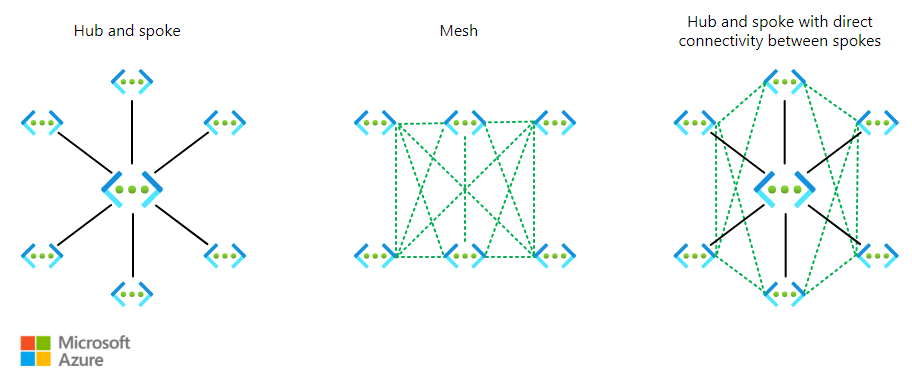
Why this central documentation is useful?
Azure Architecture is challenging. It changes regularly, new services, updates to old ones, can change design principles. Keeping up to date, applying the latest best practice, and being confident in a performant and well designed solution is important. Docs help with this. A huge amount of work is put into these web pages. They are your first point of call for new detail, they are your sanity check on something you can’t quite remember, and they are your older sibling, backing you up if/when you are questioned on a design decision. Use them – always.
Did you know you can contribute?
One final point – you can help make Docs better. You can fix an item you have spotted that isn’t correct, or simply suggest an improvement. Microsoft have written and maintain a full guide here – Overview of editing documentation on Microsoft Learn. For anyone familiar with GitHub, this will be simple for you. For anyone who would like to get familiar with it, this is a great entry point!
As always, if there are any questions, get in touch!




 wedoAzure