Joepilot or Copilot? Networking edition | Azure Back to School 2025

Introduction

Firstly, it’s great to be featured for Azure Back to School in 2025. It is an excellent event every year, and the people involved run it brilliantly. Thank you once again for having me!

I have posted about Copilot in Azure previously, including a network focussed post for this event last year. After last year’s event, Microsoft announced Networking specific focussed features that really caught my attention. Finally, Microsoft announced that Copilot in Azure eventually hit GA earlier this year. All of this together made me think I should write a follow-up and try get to an updated answer for the question – Joepilot or Copilot?

So – what’s different to last year? At a basic level, you should see improvements essentially everywhere. Performance of responses, accuracy of output, capability expansion and just general usability. Oh and also, it’s still ‘free’! However, that’s all a bit broad. So I decided to focus on 3 aspects that Copilot promises to be/deliver – Specialist, Architect, Engineer.


This is how Microsoft frame this:

Think of Copilot as an all-encompassing AI-Powered Azure Networking Assistant. It acts as:

  • Your Cloud Networking Specialist by quickly answering questions about Azure networking services, providing product guidance, and configuration suggestions.
  • Your Cloud Network Architect by helping you select the right network services, architectures, and patterns to connect, secure, and scale your workloads in Azure.
  • Your Cloud Network Engineer by helping you diagnose and troubleshoot network connectivity issues with step-by-step guidance.

The Specialist โ€“ Deep Knowledge on Demand

  • What I Expected:
    • Copilot as a subject matter expert: quick answers, best practices, and troubleshooting tips.
  • What I Tested:
    • Several real-world scenarios: e.g. configuring VNet peering, diagnosing NSG rules, or BGP route issues.
  • What I Found:
    • Strengths: A big jump in speed, accuracy, and contextual awareness.
    • Weaknesses: gaps in nuanced scenarios, but that’s me being pushy/specific (Still can’t answer my effective routes on a gateway subnet question ๐Ÿ™‚ ), and the odd hallucination.
  • Verdict:
    • Does it replace a human specialist, or just accelerate one? I think it now truly accelerates a specialist. And if you are not a specialist, I think you finally have a legitimate assistant to answer questions, or even sanity check approaches with.

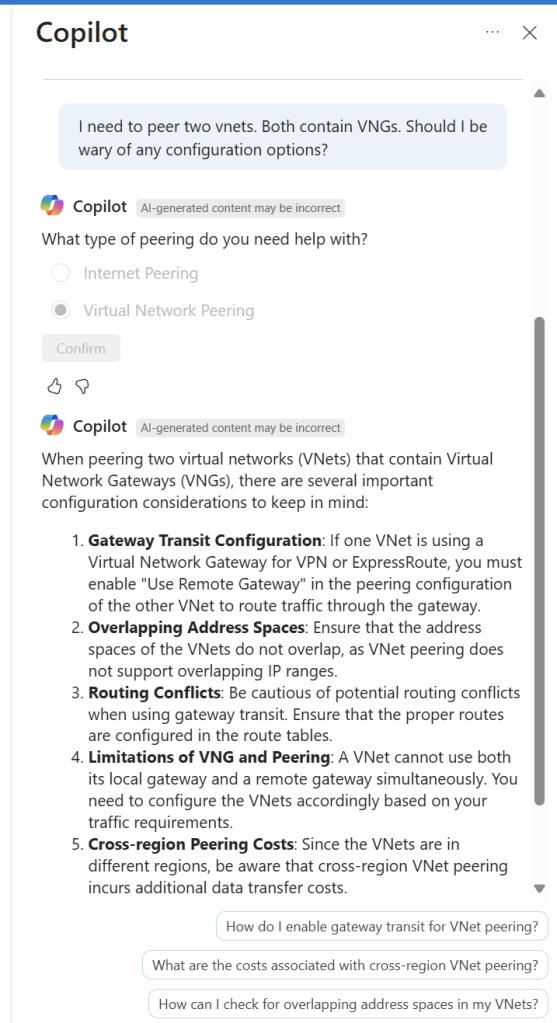
I’ve screen grabbed my favourite example below; vnet peering with a twist. I like that it asked for context on peering type, it does get the scenario correct in terms of advice at line 4, however I would have preferred it a bit earlier, as line 1 is potentially confusing otherwise. It did just make up the different regions bit, classic hallucination. Follow-on prompts are both useful and accurate.
The Architect โ€“ Designing the Big Picture

  • What I Expected:
    • Copilot helping with architecture scenarios, design patterns, and compliance considerations.
  • What I Tested:
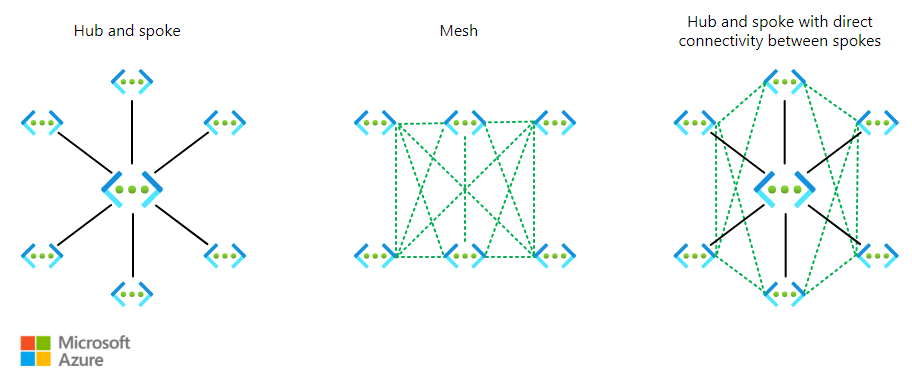
    • Example: designing a hub-and-spoke network with security and governance baked in. Complex routing leads to service/resource recommendations. Design vs service scenarios.
  • What I Found:
    • Pros: quick generation of templates, reference architectures.
    • Cons: lacks business context, sometimes over-simplifies.
  • Verdict:
    • Can Copilot think like an architect, or is it just a pattern matcher? I think it’s both. It is accurate enough that you can sanity check your own ideas, or it can suggest ideas for areas you are not familiar with. However, it still lacks the deep nuanced guidance an expert offers.

Again, I have screen grabbed my best example of use below. I felt this was a good test scenario, a unique requirement, such as branch-to-branch, and specific additions, like secure internet. It gets this nearly perfect, however item 3 needs refinement relative to VWAN, or it’s simply wrong! I like the addition of an optional ER and the control and governance of NSGs and Watcher are a welcome inclusion. Being transparent, I had mixed success with direct follow-ups on routing design specifics.

I did have a follow-up I was impressed with though and it’s also a nice segue to the next section! For the sake of this article length and readability, I am not going to paste all of the code, but it worked and was accurate for what I asked for – an example build. Think about just how handy this is! It generated that in less than 60 seconds.

The Engineer โ€“ Hands on the Console

  • What I Expected:
    • Copilot writing scripts, ARM/Bicep templates, and CLI commands.
  • What I Tested:
    • Deploying a secure VNet with subnets, NSGs, and routing. Adding a VNG with specific SKU requirements.
  • What I Found:
    • Great at the basics, decent at custom tweaks, but watch for syntax quirks.
  • Verdict:
    • Does it save time or create rework? It saves a lot of time getting you past a blank page or from zero knowledge to working. However, once you start layering complexity, you enter a world of rework. Stick to what it is good at and I have no complaints.

This is where I see the most challenging task for Copilot. We move away from advice, greenfield approach etc into messy, complicated existing Azure environments (I would never have a messy environment you say – I have seen enough of them to know we are all guilty here!). I started with testing some of the default prompts – How do I create a new resource group and move resources into it with Azure CLI? – and not only is the output good/accurate the instructions around it are too, with advice and usage flags.

Next a greenfield deployment of a VNET with complex/specific requirements, trying to include nuanced items that will limit you later, like the subnet size of a GatewaySubnet.

I want to build a secure VNet with subnets, NSGs, and routing tables. NSGS and route tables can be default for now. It must include a gateway subnet capable of accommodating two VNGs, it must have 4 other equally sized subnets named - app, dev, infra, dmz. It should use the address space 10.10.155.0/23

The code here was good, but not 100% accurate, as it included no route tables (I am putting this down to my wording relative to default routing, as repeating this with a few tweaks actually did include it). I wouldn’t have made any edits myself except for personal preference formatting etc. So I moved onto something more complex:

Update this to include a VNG to support a resilient VPN with a bandwidth of at least 1Gbps

This time I will include the code… My hope here was that it would simply add the required aspects to include a VNG of the correct SKU within the existing code of a single VNET. However, for some reason I think it took resilient as duplicate! I now have code for two VNETs, it no longer adheres to my address space requirements, and it connected the two VNETS via VPN!

// The code was generated by AI which may result in unintended or inaccurate code. A human must validate that it accomplishes the desired goal before deploying the template.

@description('The shared key used to establish connection between the two vNet Gateways.')
@secure()
param sharedKey string

@description('The SKU for the VPN Gateway. Must support at least 1Gbps bandwidth.')
@allowed([
  'VpnGw2'
  'VpnGw3'
])
param gatewaySku string = 'VpnGw2'

@description('Location of the resources')
param location string = resourceGroup().location

var vnet1cfg = {
  name: 'vNet1-${location}'
  addressSpacePrefix: '10.0.0.0/23'
  subnetName: 'subnet1'
  subnetPrefix: '10.0.0.0/24'
  gatewayName: 'vNet1-Gateway'
  gatewaySubnetPrefix: '10.0.1.224/27'
  gatewayPublicIPName: 'gw1pip${uniqueString(resourceGroup().id)}'
  connectionName: 'vNet1-to-vNet2'
  asn: 65010
}
var vnet2cfg = {
  name: 'vnet2-${location}'
  addressSpacePrefix: '10.0.2.0/23'
  subnetName: 'subnet1'
  subnetPrefix: '10.0.2.0/24'
  gatewayName: 'vnet2-Gateway'
  gatewaySubnetPrefix: '10.0.3.224/27'
  gatewayPublicIPName: 'gw2pip${uniqueString(resourceGroup().id)}'
  connectionName: 'vnet2-to-vnet1'
  asn: 65050
}

resource vnet1 'Microsoft.Network/virtualNetworks@2020-06-01' = {
  name: vnet1cfg.name
  location: location
  properties: {
    addressSpace: {
      addressPrefixes: [
        vnet1cfg.addressSpacePrefix
      ]
    }
    subnets: [
      {
        name: vnet1cfg.subnetName
        properties: {
          addressPrefix: vnet1cfg.subnetPrefix
        }
      }
      {
        name: 'GatewaySubnet'
        properties: {
          addressPrefix: vnet1cfg.gatewaySubnetPrefix
        }
      }
    ]
  }
}

resource vnet2 'Microsoft.Network/virtualNetworks@2020-06-01' = {
  name: vnet2cfg.name
  location: location
  properties: {
    addressSpace: {
      addressPrefixes: [
        vnet2cfg.addressSpacePrefix
      ]
    }
    subnets: [
      {
        name: vnet2cfg.subnetName
        properties: {
          addressPrefix: vnet2cfg.subnetPrefix
        }
      }
      {
        name: 'GatewaySubnet'
        properties: {
          addressPrefix: vnet2cfg.gatewaySubnetPrefix
        }
      }
    ]
  }
}

resource gw1pip 'Microsoft.Network/publicIPAddresses@2020-06-01' = {
  name: vnet1cfg.gatewayPublicIPName
  location: location
  properties: {
    publicIPAllocationMethod: 'Dynamic'
  }
}

resource gw2pip 'Microsoft.Network/publicIPAddresses@2020-06-01' = {
  name: vnet2cfg.gatewayPublicIPName
  location: location
  properties: {
    publicIPAllocationMethod: 'Dynamic'
  }
}

resource vnet1Gateway 'Microsoft.Network/virtualNetworkGateways@2020-06-01' = {
  name: vnet1cfg.gatewayName
  location: location
  properties: {
    ipConfigurations: [
      {
        name: 'vnet1GatewayConfig'
        properties: {
          privateIPAllocationMethod: 'Dynamic'
          subnet: {
            id: resourceId('Microsoft.Network/virtualNetworks/subnets', vnet1.name, 'GatewaySubnet')
          }
          publicIPAddress: {
            id: gw1pip.id
          }
        }
      }
    ]
    gatewayType: 'Vpn'
    sku: {
      name: gatewaySku
      tier: gatewaySku
    }
    vpnType: 'RouteBased'
    enableBgp: true
    bgpSettings: {
      asn: vnet1cfg.asn
    }
  }
}

resource vnet2Gateway 'Microsoft.Network/virtualNetworkGateways@2020-06-01' = {
  name: vnet2cfg.gatewayName
  location: location
  properties: {
    ipConfigurations: [
      {
        name: 'vNet2GatewayConfig'
        properties: {
          privateIPAllocationMethod: 'Dynamic'
          subnet: {
            id: resourceId('Microsoft.Network/virtualNetworks/subnets', vnet2.name, 'GatewaySubnet')
          }
          publicIPAddress: {
            id: gw2pip.id
          }
        }
      }
    ]
    gatewayType: 'Vpn'
    sku: {
      name: gatewaySku
      tier: gatewaySku
    }
    vpnType: 'RouteBased'
    enableBgp: true
    bgpSettings: {
      asn: vnet2cfg.asn
    }
  }
}

resource vpn1to2Connection 'Microsoft.Network/connections@2020-06-01' = {
  name: vnet1cfg.connectionName
  location: location
  properties: {
    virtualNetworkGateway1: {
      id: vnet1Gateway.id
      properties: {}
    }
    virtualNetworkGateway2: {
      id: vnet2Gateway.id
      properties: {}
    }
    connectionType: 'Vnet2Vnet'
    routingWeight: 3
    sharedKey: sharedKey
    enableBgp: true
  }
}

resource vpn2to1Connection 'Microsoft.Network/connections@2020-06-01' = {
  name: vnet2cfg.connectionName
  location: location
  properties: {
    virtualNetworkGateway1: {
      id: vnet2Gateway.id
      properties: {}
    }
    virtualNetworkGateway2: {
      id: vnet1Gateway.id
      properties: {}
    }
    connectionType: 'Vnet2Vnet'
    routingWeight: 3
    sharedKey: sharedKey
    enableBgp: true
  }
}

The Reality Check โ€“ Am I Smarter Than Copilot?

  • Summarize findings across all three roles.
  • Discuss where Copilot shines and where human expertise is irreplaceable.
  • Reflect on the โ€œpartnershipโ€ model: Copilot as an accelerator, not a replacement.

This is one of those articles that I really enjoy writing. You sit down to research, plan, and test with a genuine spark of interest but no clear outcome. To start, I have to say I am impressed with the progress. It’s a very different tool to last years. In my view, it is definitively capable across all three roles, I don’t think that can be debated any longer.

The improvements in performance and accuracy, the addition of skills, and potentially the increased user familiarity all combine to make an impressive assistant to your day-to-day work in Azure. And as it’s ‘free’, why would you not make use of the quick wins and detail it can offer?

However, with my head held high I can confidently say – I am still better than it! Having said that, I think I now find myself thinking that maybe the more important question, and perhaps the one that matters is – am I better with it our without it? Perhaps that’s a follow up post…

Microsoft Copilot in Azure – Networking Edition

Welcome all from Azure Back to School, another year and another excellent community event from the guys behind the scenes. And a thanks to the event sponsors Captain Hyperscaler and Trace3.

For this year, I have decided to combine my favourite tech – Azure Networking – with the buzziest tech of the moment – Copilot. Specifically of course, Microsoft Copilot in Azure.

For those not familiar with this, or Copilot of any form, essentially it is an AI assistant. Microsoft are aiming to make these services as integrated as possible. So, you see Copilot logos, chats, prompts etc built into portals and applications to help make engagement with the service as seamless as possible.

Screengrab of Copilot for Azure chat window

Copilot in Azure, is exactly as it sounds, an AI assistant focussed on Azure. It has mixed capabilities depending on what you are trying to do. It is currently in Public Preview, at no additional cost, so I would recommend making use of it for assessment purposes, if it is of interest to you.

There are a base set of use cases as below, so I want to explore how practical these are across some common Networking services.

Let’s start with Virtual Network!

Design – I’ve actually already covered an attempt at this here – How to โ€“ Design a Virtual Network with Microsoft Azure Copilot

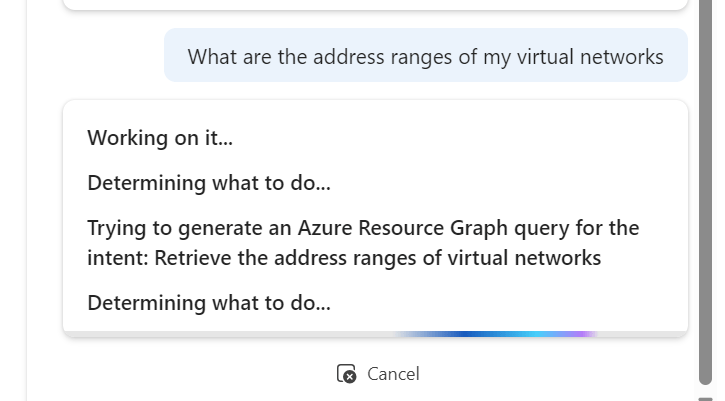
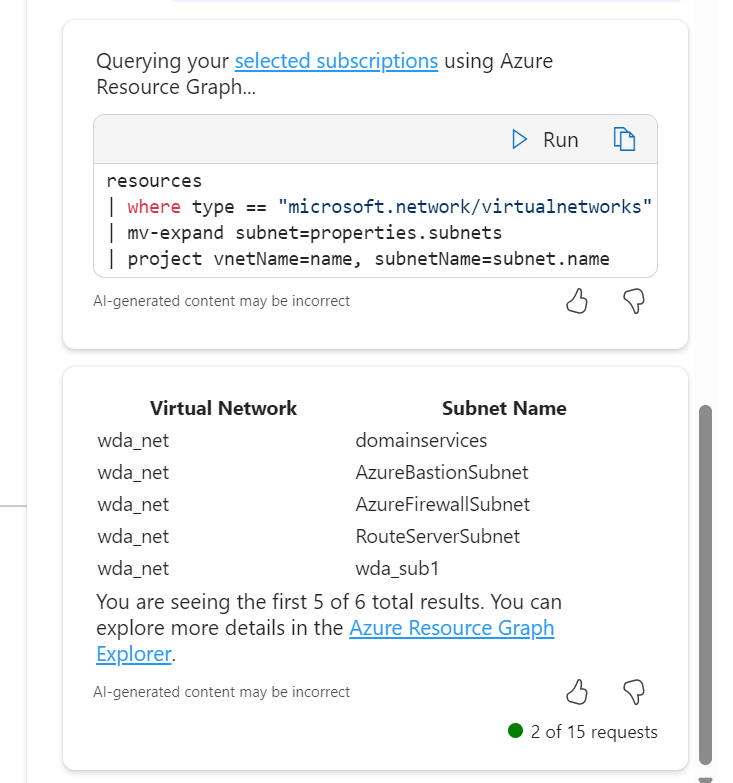
Operate – I tried some basic queries, and they worked quite well actually. It defaults to Resource Graph queries to convert your ask to something tangible.

What I like here, and where this service has improved since launch, is the follow up suggestions are now based on capabilities and aligned to previous asks, so I now get:

Choosing the subnets ask, it outputs via Resource Graph, a nice list for me however I was expecting it to include the address ranges, not just the names. However, a follow up ask displays them no problem.

Optimise – This one is trickier. A limitation here is me working within my demo environments, which have either limited functionality, or are configured exactly to best practice. Here was the set of questions I tried and answers I got:

  • Are there any active recommendations for my virtual networks
    • There are no active alerts in resource group rg_network for resource type microsoft.network/virtualnetworks
  • Can you show me the metrics for my virtual networks?
    • Responded with a table of all possible metrics, but no details linked to my resources
  • are there any reliability improvements I could make to my virtual networks
    • Responded with a list of best practice recommendations and reference links again not related to my resources.

I think one of the challenges here is the prompt and possible output. There isn’t really enough information or intelligence to be able to respond. For example, if I phrased a question similar to “are there any improvements I could make to my virtual network address ranges” It doesn’t give anything specific to my virtual networks, just accurate best practice advice.

Troubleshoot – So I don’t have a specific issue to ask it about, so I looked for what might be useful, maybe something you don’t know about!

Neither are great responses to be honest. As at least the second was a question I thought would allow for query generation. I couldn’t find a useful one here for this use case, which is a shame, but my guess would be this improves over time, perhaps as it is able to better work with Azure Advisor.

Next, let’s take a look at a Public IP

Design – I know this won’t take information from my own resources, so this just helps with best practice guidance. I went for a question I think most people, even some who have worked with for Azure for a while aren’t sure about and I was impressed with the response. Good examples, excellent awareness and detail in my opinion.

Operate – For this use case, I tried some knowledge gathering queries. I was most impressed with the below. Clever query creation, accurate result, clear (enough) presentation. Exactly what you need for at scale work like this. Not sure why it added Location, but no harm done!

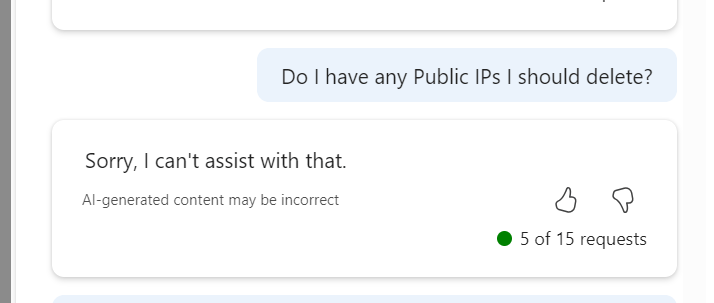
Optimise – Starts getting tricky here. I know there is little that can be done for say Cost or Performance, and there are so maybe contextual questions that could be better with more context, like asking for ‘orphaned’ IPs instead of the below

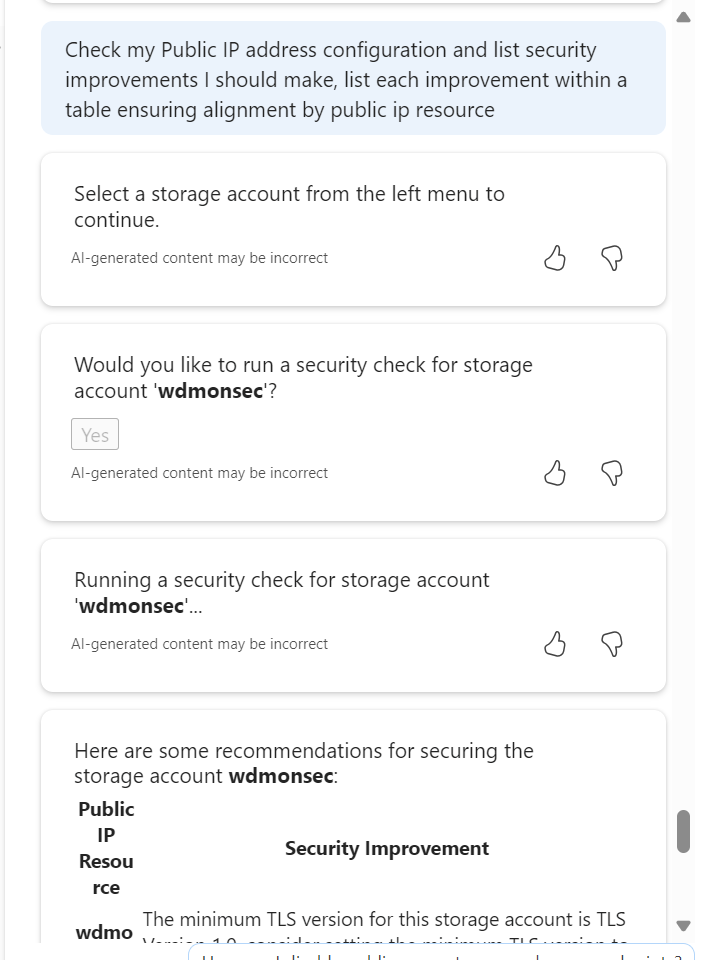
I tried a security configuration check and recommendation prompt, but it somehow lost its way and prompted to choose a Storage Account, I did, and it gave accurate recommendations for that. Confusing how that happened, but also the output is what I wanted, so kinda half correct?

Troubleshoot – Basic but effective, C minus.

I think I started to crack the best prompt methods at this point in the article research. I quite like this format and output, but I am aware this requires advanced knowledge of the resource and options in advance of prompting. It also got the associated resource part wrong, that’s an orphaned IP I have been working with.

Finally, let’s look at Network Security Group

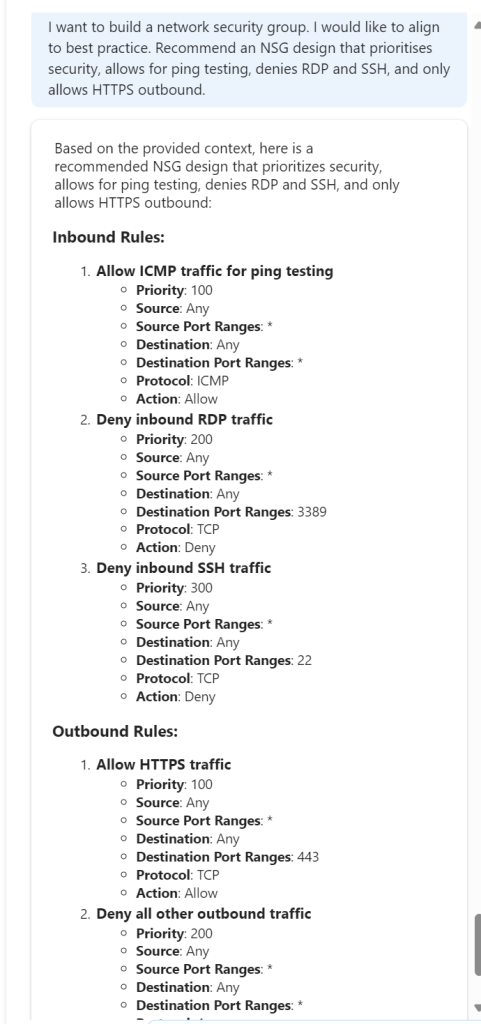
Design – This is difficult in one way. You can build an NSG with nearly no configuration, just name and location. And that ticks a Defender for Cloud box, if you attach to a subnet etc. But generally there is more configuration, so I thought how could this help me? Well what if I give it my needs and see can it give the right logical output…

Nice! Now, can it help me build it?

Colour me impressed – this was my best interaction to date. Clear, accurate and usable.

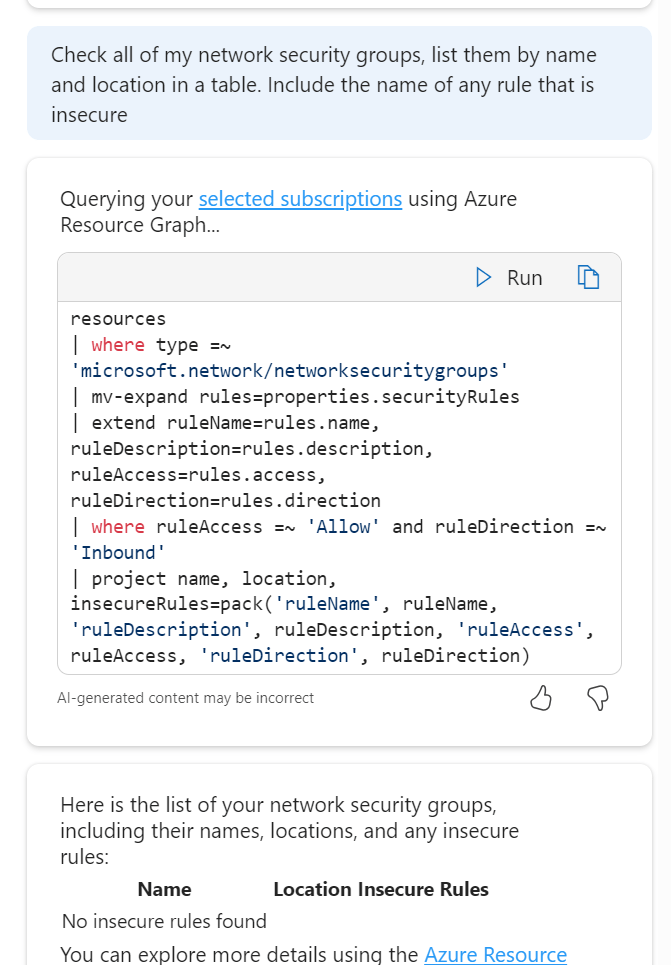
Operate Optimise Troubleshoot- A triple whammy as I started to drift across the lot at this point in terms of use case. I wanted to try queries that would help me work with NSGs both day to day and in a potential high stress situation. So I started with this:

So it took my context and decided that a rule that has allow enabled and a direction of inbound would be insecure, fair enough, or at least worth checking in on. Comes back with the correct answer! So, I switched up a few rules on my NSGs to allow all inbound from any source etc. The Portal flags this is as a dumb decision, let’s see if Copilot spots it.

Nope – odd result there. So I tried it a different way. Again, this means I have to know more advanced detail, but nothing you wouldn’t pick up quickly as you upskill.

Output correct! They are the three rules I switched up. It didn’t directly get my port element right, but that just needs a more accurate prompt. I think one logical approach for actual operational queries is to think in pseudo code, and in steps, allowing it work to your meaning quicker. Essentially avoid prompts like – ‘any rules giving off bad vibes in my NSGs? Respond in iambic pentameter’ – they don’t work and let’s be honest, are weird.

To wrap up – I like Copilot in Azure now. I have found multiple use cases that would actually help me work day-to-day. However, would that work be quicker? I am not sure. I feel like I would need to build up a prompt library. And if I was doing that, why would I not just use Resource Graph queries instead? Quicker, more accurate etc. Also, some of the knowledge levels required don’t allow it to be most useful to the people I think it should be useful to – Azure newbies. Design and advice sure, actual hands-on resource work appears to require more contextual knowledge.

Some helpful links to hit up for Copilot in Azure:

Overview

Responsible AI FAQ

Example prompts

Manage access – will become more important depending on your use cases, the cost when it hits GA etc.

As always, get in touch if you have any questions, or even if you have prompts you want to chat about! And don’t worry, I reverted those terrible rule changes right after testing ๐Ÿ™‚

Don’t forget to check out all of the other content throughout the month over on Azure Back to School!

Exploring – Network Design in the Azure Architecture Center

One of the most common deployment, and as a result, design requirements in Azure, is Networking. Within all environments, not just Azure, Networking is critical. It is of upmost importance to get the design right, and get it right early.

However, if starting out on Azure, or potentially looking to progress to a more complex design based on requirements, Networking can be challenging. Not only is it a vast component of Azure, it has some of its own quirks in comparison to your on-prem environment. From experience, I have seen this lead to incorrect assumptions and frustration once a design is finally in use.

However, good design can obviously be somewhat subjective. For example, avoid discussing naming conventions for Azure on Twitter/X! (I joke…) But what can really help is to follow or at least begin with best practice. For Azure, this is thankfully centrally located for you on Docs. I know it’s called Learn now, but I will forever call it Docs – the difference it made to us all when it launched means it has my loyalty forever! Below is an image from Ignite 2018, where Docs was launched, and I spent more time than I’d like to admit winning one of those mascots. A mascot my small dog subsequently got hold of and made short work of unfortunately.

There is a wealth of information on the Azure Architecture Center, I’ve linked to Networking, but you can see there are many other sections covering all aspects of Azure. My new favourite indicator of content depth on Docs is the “Download PDF” button. For Networking alone, it is 257 pages!

Specific to Networking, it is broken into three sections:

  • Explore ideas about
  • Design Architectures
  • Apply Guidance

Explore ideas about

Here is where you will find specific and complex concepts – for example Video capture and analytics for retail. These are meant to serve as both a start point and potentially a comparison solution/concept. Architects should use these as references and examples of what is possible.

Design Architectures

This is divided in two:

  • Network Topology – Here you will find high-level architectures, example arrangements of network components and best practice guidance for knitting your network fabric together.
  • Network Security – Same idea here, guidance and some specific Security scenarios.

Apply Guidance

This is the big section. It contains expansions and further guidance on the previous sections. This has some of the most useful guidance, whether you are starting out with Azure or not. One of the most useful articles for me is Network Level Segmentation.

This article helps form your understanding and design for nearly all other patterns. It’s crucial to good network design on Azure.

The other article I would recommend or even go as far as to suggest it as required reading is Spoke-to-spoke networking. Everything you need for Virtual Network design is covered in these two articles.

Why this central documentation is useful?

Azure Architecture is challenging. It changes regularly, new services, updates to old ones, can change design principles. Keeping up to date, applying the latest best practice, and being confident in a performant and well designed solution is important. Docs help with this. A huge amount of work is put into these web pages. They are your first point of call for new detail, they are your sanity check on something you can’t quite remember, and they are your older sibling, backing you up if/when you are questioned on a design decision. Use them – always.

Did you know you can contribute?

One final point – you can help make Docs better. You can fix an item you have spotted that isn’t correct, or simply suggest an improvement. Microsoft have written and maintain a full guide here – Overview of editing documentation on Microsoft Learn. For anyone familiar with GitHub, this will be simple for you. For anyone who would like to get familiar with it, this is a great entry point!

As always, if there are any questions, get in touch!

How to – Design a Virtual Network with Microsoft Azure Copilot

Having access to Microsoft Azure Copilot has been really interesting. On one hand, the use cases are almost limitless, essentially a choice of what do you want to try do with it? On the other, there is still work to be done to maximise its potential (acknowledge by Microsoft throughout use in fairness).

Working with any of the ‘Copilots’, one important element for me is to get a grounded understanding of what it is capable of, based on something I am an expert on. I cannot tell how good it is if I am asking it help with something I don’t know arguably better than it does. So – let’s I decided to push it with a Virtual Network.

My objective when starting this post was to hopefully reach the point where one single, detailed prompt would spit out an acceptable VNET design statement, perhaps even the code to build it, but that part was less important to me right now. Anyone can create a good Azure design right? ๐Ÿ™‚

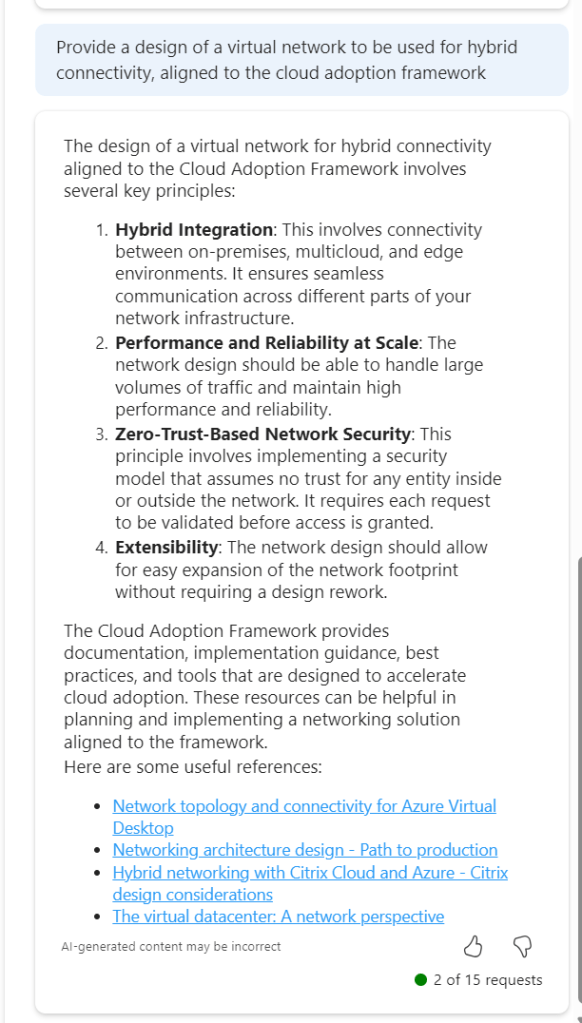
I am first going to outlay my thinking with respect to a VNET, it’s purpose, my security posture, connectivity requirements, and likely workloads. Rewording this into a statement that is aligned to the Cloud Adoption Framework, and Azure Network Architecture details.

To get a baseline of a basic prompt, I started with the below. I believe this helps work towards the ‘best’ prompt.

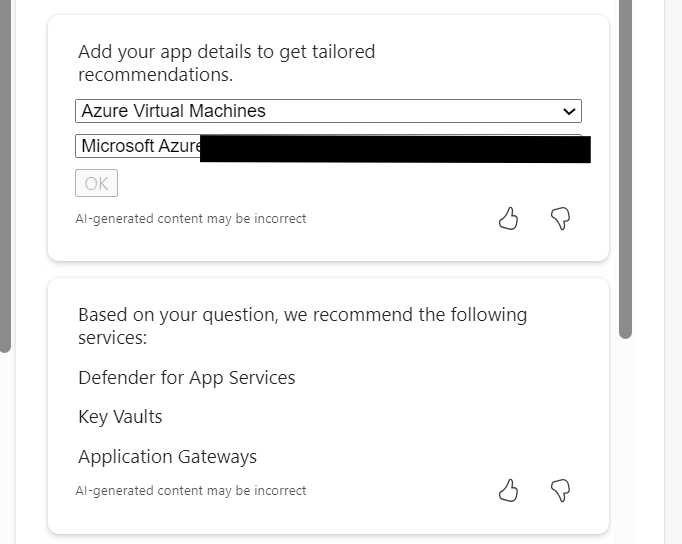
So this jumps all over the place. We have perimeter references, AVS and App Gateway all mentioned. Not ideal. But I did ask for an example, and it does provide links. So let’s tighten our prompt.

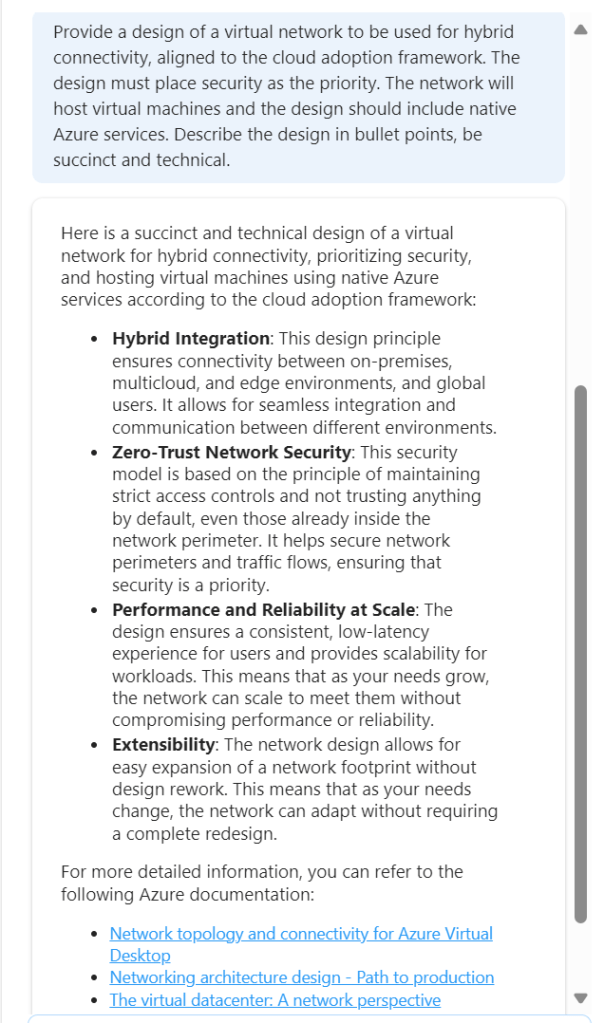
This is much better, proper sequential statements, however that third link to hybrid with Citrix is irrelevant. Now, as Copilot functions in a chat method, let’s use this prompt and response to expand detail.

So this approach doesn’t work. When you select the (perhaps) relevant items, the output is not aligned to the original ask.

So – let’s try this another way. We know the first recommend prompt returned good results. Rather than continue in a chat-response format, let’s try one very specific prompt. To ensure no confusion – I started a new chat for this.

This is better, but to be honest – I am not looking for design principles like ‘zero trust’. So we need to adjust the wording. Again, I have started a new chat for this.

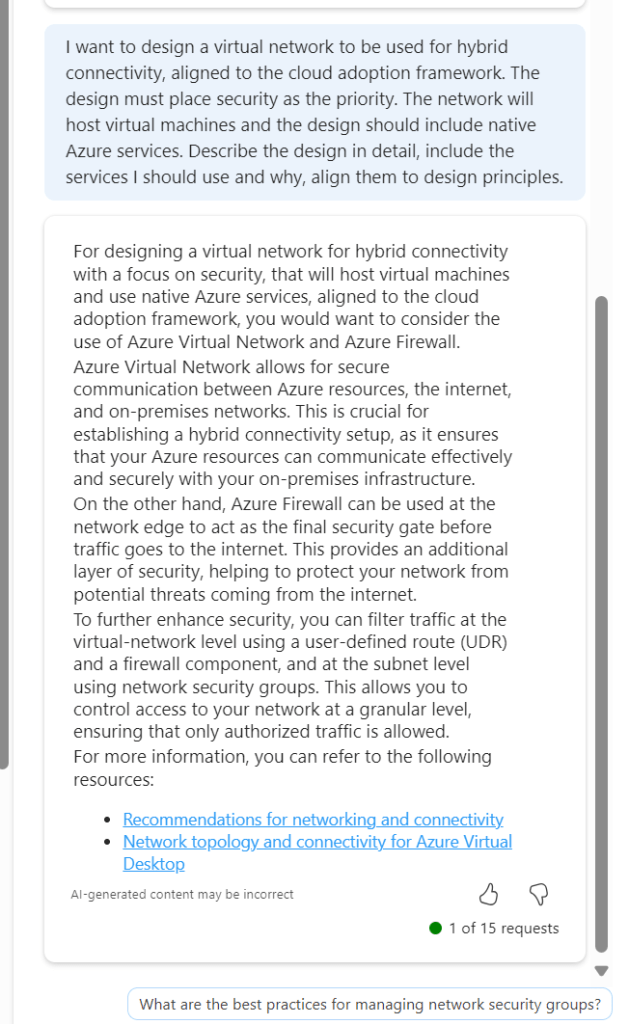
Now we are getting somewhere. If this had included Bastion I would have ranked it 9/10. The first link is good, second link is not so this scores a 7/10 for me. It is a great improvement on previous asks, and I am trying to ask as few leading questions as possible. I tried another following response to get some more detail

Again, the general detail is good, but the links are hit and miss. This could introduce some confusion. I tried another follow on from this, but again it went a different route based on my existing subscription services.

Rather than say this didn’t work, I think I have set out with a task that isn’t really achievable at present. There are so many elements that require consideration, some sequential, some overlapping, some interdependent, that a single chat response is going to be very difficult if not impossible. At the same time, repeat responses are also challenging, especially when you’re not looking for something relevant to what you currently have, but aligned to best practice.

Overall, I think Copilot for Azure is improving every month, and the use cases are constantly expanding. However, I don’t believe, based on current functionality that it will be able to fully assist with design guidance and decisions, beyond providing principles and guided links. For the real design work – you will still need an expert ๐Ÿ˜‰

What is – Azure Firewall Policy Analytics

Ever since the change to Azure Firewall Policy from classic rules, there has been a requirement and a want to have greater inspection capabilities with regard to your Azure Firewall Policies (AFPs). Depending on your environment, you might have several, or several hundred AFPs in place, securing your Azure footprint. Regardless, analytics of these policies is crucial.

With the increasing adoption of cloud workloads, and as workloads move to the cloud, network security policies like AFPs must evolve and adapt to the changing demands of the infrastructure, which can be updated multiple times a week, which can make it challenging for IT security teams to optimise rules.

Optimisation while at least retaining, if not increasing security, is key objective with AFP Analytics. As the number of network and application rules grow over time, they can become suboptimal, resulting in degraded firewall performance and security. Any update to policies can be risky and potentially impact production workloads, causing outages, unknown impact and ultimately – downtime. We’d like to avoid all of that if possible!

AFP Analytics offers the ability to analyse and inspect your traffic, right down to a single rule. Several elements are enabled without action, however, I would recommend enabling the full feature set, which is a simple task. Open the AFP you’d like to enable it for, and follow the steps linked here.

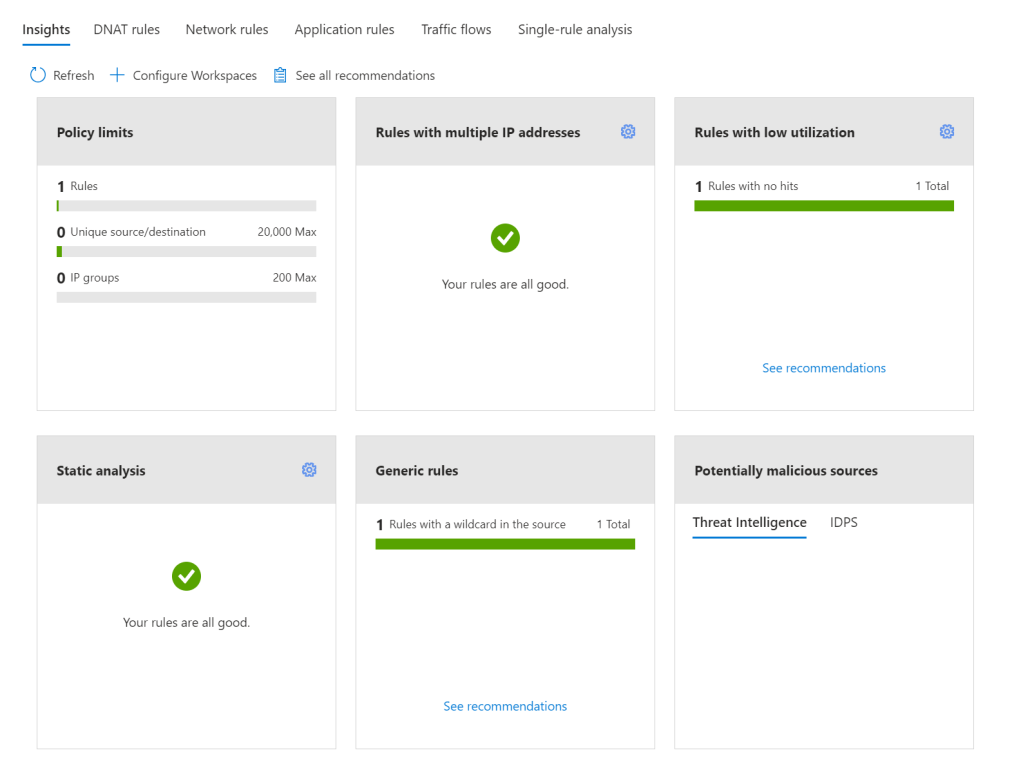
Once enabled, AFP Analytics starts to fully inspect your Policy and the traffic passing through it. My demo Azure Firewall, currently looks fantastic, as nothing is happening ๐Ÿ™‚

AFP Analytics blade in Azure Portal

There are several key features to make use of with AFP Analytics, Microsoft list them as follows:

  • Policy insight panel: Aggregates insights and highlights relevant policy information. (this is the graphic above)
  • Rule analytics: Analyses existing DNAT, Network, and Application rules to identify rules with low utilization or rules with low usage in a specific time window.
  • Traffic flow analysis: Maps traffic flow to rules by identifying top traffic flows and enabling an integrated experience.
  • Single Rule analysis: Analyzes a single rule to learn what traffic hits that rule to refine the access it provides and improve the overall security posture.

Now I view all of these as useful. I can see the purpose and I can see myself using them regularly. However, I was most excited about – Single Rule Analysis – that was, until I went to test and demo it.

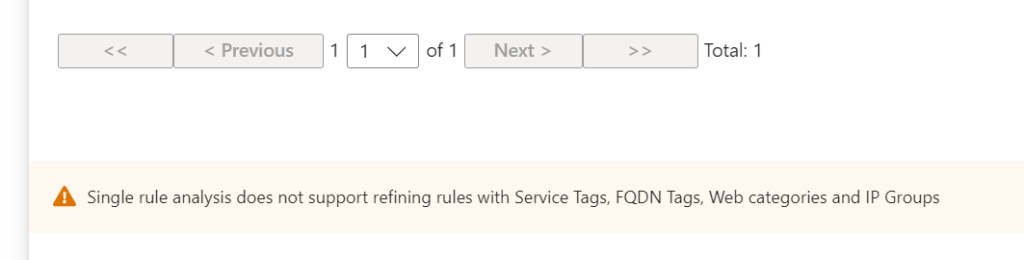
I created a straight forward Application rule, a couple of web categories allowed on HTTPS. I enabled Analytics, sat back for a bit, got a coffee (it recommends 60 minutes due to how logs are aggregated in the back end) and then tried it out. To my disappointment, I was met with the below:

Tags and categories I could initially understand, but IP Groups confused me. I thought, this is a core feature, why not allow analysis when this is in scope – then I realised; the analysis is aiming to optimise the rule. AFP views rules using these as fairly spot on already. So, I decide to create a stupid rule (in my opinion). Allowing TCP:443 from around 20 IPs to around 10 IPs. First up, my Insight Panel flagged it

Next, Single Rule Analysis and…success, it dislikes the rule! It summarises it, and flags the aspects it does not feel are optimal. I did expect the recommendation to be to delete the rule, as you can see it is flagging there is no traffic matching the rule, but perhaps the caution here is in combination with the rule and data in place for the last 30 days, or lack thereof.

I can see this feature being really powerful in a busy production environment. There are some more scenarios listed on Microsoft’s blog announcement of GA earlier in the year too, if you’d like to check them out.

A final note. While you might think that it’s only the Log Analytics element you have to pay for to make use of AFP Analytics, you would be wrong. There is a charge for the enablement, analysis, and insight components. These price in at around โ‚ฌ225/month, billed hourly. So double check your budget before enabling on every AFP.

As always, if you have any questions, please just ping me!