How to – Secure an Application Service with Application Gateway v2

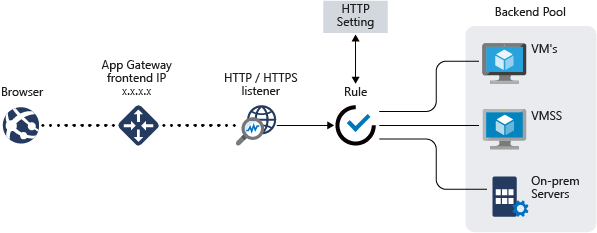
Application Gateway conceptual

Application Gatway v2 brings several welcome additions to the service since it’s initial v1 release. For those who have spent time configuring an Application Gateway, you’ll be glad to hear that udpate/modification times have been drastically reduced. Better performance and the addition of functionality are some of the other main reasons to use v2 over v1. The entire list can be found here.

Recently, I had to secure an Application Service with an Application Gateway v2 on the WAF (web application firewall) tier. This is something I have done several times with v1 without any significant issue. In this instance the Application Service runs on a custom domain as does the Application Gateway. Requirements were to run SSL end to end and have WAF run in prevention mode.

If you’ve ever done this before, you know there are some basics to be completed within your Application Service. For this post and my requirement, they were map a custom domain, runs HTTPS only and prep rules to allow connections only from your Application Gateway. How to do all of that can be found at the following links:

Once your Application Service is ready to go, you move on to configuring your Application Gateway. This is a relatively simple process and can even be completed within the Portal. There is a published guide here. However, once it was configured, I noticed that certain redirect functionality aspects of the application were returning the default host name of the Application Service. This can also happen if you use Azure AD authentication. With WAF in prevention mode, this returns a 403 as a default rule picks up the change in address.

The reason for this is how both Application Gateway and Application Service handle their host headers. To fix this issue, there are two changes you can make, one of which that is only possible on Application Gateway v2.

The v2 only fix is to rewrite the location in the host header using rewrite rules. Rewrite rules are new functionality only included in v2. A guide on what you need to do exactly is here. Make sure the text is exactly as in the guide or it will not work.

The second option, and the one that is more common is to change how your Custom Probe and HTTP settings are configured. The reason for this is that the default guide does not take into account the use of a custom domain on your Application Service. For both settings, modify and remove the ” PickHostNameFromBackendAddress” setting. Now, the Application Gateway will forward the same hostname and redirection will happen on the same too. Full guide here.

As always, if there are any questions on the above, get in touch!
AZ-301: Microsoft Azure Architect Design – Study Guide

Now that AZ-302 has officially been retired, there is only one route to earn your Microsoft Certified: Azure Solutions Architect Expert certification. That route is to sit and pass both the AZ-300 and the AZ-301 exams. Currently this is arguably the most difficult exam certification path as it is one of only two Expert level certifications for Azure. This post will cover AZ-301, here is what Microsoft have to say about it:

This exam measures your ability to accomplish the following technical tasks: determine workload requirements; design for identity and security; design a data platform solution; design a business continuity strategy; design for deployment, migration, and integration; and design an infrastructure strategy.

Below I’ve put together a collection of links relevant to the sections highlighted as being part of the skills measured for this exam. As always, these are only guide links, sometimes you need to explore a topic much more deeply if you are not familiar with it. Hopefully these study materials will help guide you to successfully passing AZ-301!

If you spot something, or have a better link for a topic, get in touch! I will update this post as regularly as possible and always appreciate any feedback.

A good place to start is Microsoft Learn. there are several interactive learning paths that are free that you can work through at your own pace. I find this a great way to study and gain greater understanding of the services by actually using them.

Determine workload requirements

Gather Information and Requirements

This section requires broad knowledge of the platform and general IT architecture experience. My recommendation would be to familiarise yourself with the Azure Architecture Center.

Optimize Consumption Strategy

Design an Auditing and Monitoring Strategy

Design for identity and security

Design Identity Management

Design Authentication

Design Authorization

Design for Risk Prevention for Identity

Design a Monitoring Strategy for Identity and Security

Design a data platform solution

Design a Data Management Strategy

Design a Data Protection Strategy

Design and Document Data Flows

Design a Monitoring Strategy for the Data Platform

Design a business continuity strategy

Design a Site Recovery Strategy

Design for High Availability

Design a Data Archiving Strategy

Design for deployment, migration, and integration

Design Deployments

Design Migrations

Design an API Integration Strategy

Design an infrastructure strategy

Design a Storage Strategy

Design a Compute Strategy

Design a Networking Strategy

Design a Monitoring Strategy for Infrastructure

AZ-300: Microsoft Azure Architect Technologies – Study Guide

Now that AZ-302 has officially been retired, there is only one route to earn your Microsoft Certified: Azure Solutions Architect Expert certification. That route is to sit and pass both the AZ-300 and the AZ-301 exams. Currently this is arguably the most difficult exam certification path as it is one of only two Expert level certifications for Azure. This post will cover AZ-300, here is what Microsoft have to say about it:

This exam measures your ability to accomplish the following technical tasks: deploy and configure infrastructure; implement workloads and security; create and deploy apps; implement authentication and secure data; and develop for the cloud and Azure storage.

Below I’ve put together a collection of links relevant to the sections highlighted as being part of the skills measured for this exam. As always, these are only guide links, sometimes you need to explore a topic much more deeply if you are not familiar with it. Hopefully these study materials will help guide you to successfully passing AZ-300!

If you spot something, or have a better link for a topic, get in touch! I will update this post as regularly as possible and always appreciate any feedback.

A good place to start is Microsoft Learn. there are several interactive learning paths that are free that you can work through at your own pace. I find this a great way to study and gain greater understanding of the services by actually using them.

Deploy and configure infrastructure

Analyze resource utilization and consumption

Create and configure storage accounts

Create and configure a Virtual Machine (VM) for Windows and Linux

Automate deployment of Virtual Machines (VMs)

Implement solutions that use virtual machines (VM)

Create connectivity between virtual networks

Implement and manage virtual networking

Manage Azure Active Directory (AD)

Implement and manage hybrid identities

Implement workloads and security

Migrate servers to Azure

Configure serverless computing

Implement application load balancing

Integrate on-premises network with Azure virtual network

Manage role-based access control (RBAC)

Implement Multi-Factor Authentication (MFA)

Create and deploy apps

Create web apps by using PaaS

Design and develop apps that run in containers

Implement authentication and secure data

Implement authentication

Implement secure data solutions

Develop for the cloud and for Azure storage

Develop solutions that use Cosmos DB storage

Develop solutions that use a relational database

Configure a message-based integration architecture

Develop for autoscaling

How to – Implement Good Design Using Azure Architecture Center

Cloud platforms like Azure make designing solutions as efficient as possible. Whether it’s a serverless application or a chunky virtual datacenter, you can get up and running in no time. This however, has both positives and negatives. The negatives often being that this level of pace can mean bad design decisions are made.

Bad design doesn’t always happen due to pace either. Sometimes it is as simple as a solution evolving from proof-of-concept directly to production. We have all seen it happen! This means the correct resiliency, governance and performance criteria are often missed.

To avoid both of the above scenarios, my advice is to shift your thinking when it comes to Azure projects/solutions. Be prepared to spend 80% of your time on design. Delivery, as we already said can be lightning quick, there are few barriers to an efficiently delivered solution if designed correctly.

Thankfully, Microsoft offer an entire site worth of content to help with all of this. The Architecture Center is your first stop for all things design within Azure. Here you will find application architecture guides, cloud adoption frameworks and reference architectures for all of the common scenarios seen in Azure.

I am going to briefly look at three sections that can help with all of your deployments:

Best Practices – Naming Convention

This section covers exactly what you would expect. However, naming conventions are not as easily implemented in Azure as you might expect. One key point being, you cannot rename resources. Therefore, get your naming convention agreed upon and stick to it! https://docs.microsoft.com/en-us/azure/architecture/best-practices/naming-conventions

Application Architecture – Choosing Compute

Did you know there are three tiers of compute in Azure?

  1. IaaS – traditional VMs
  2. PaaS – managed hosting
  3. FaaS – ignore hosting, just code

Offering an excellent design-tree, you can understand quickly what decision could be the right fit for your solution then explore in more depth.

https://docs.microsoft.com/en-us/azure/architecture/guide/technology-choices/compute-overview

Reference Architecture – Serverless Web App

One of my favourite sections, covering multiple scenarios. Each offering best practise design and decision points regarding availability, security and scalability. Some cases also offer reference implementations on Github, meaning you can deploy right away.

https://docs.microsoft.com/en-us/azure/architecture/reference-architectures/serverless/web-app

So what are you waiting for? Head to the Architecture Center and start designing your next deployment with more confidence right now!