What are – Microsoft Applied Skills

Last month, Microsoft introduced a new method of verifying your capabilities when it comes to Microsoft technology, Applied Skills. Critically, Applied Skills is focused on verifying hands-on experience. See the blog post announcement here.

Not long after the change from MCSA/MCSE to Role Based Certifications a few years ago, a section of questions based on a lab environment was introduced. This didn’t last very long, and had several teething issues. However, I was a fan of the attempt. As a result, I am delighted to see something similar being reintroduced. Funnily enough, I also like the fact that you can gain an Applied Skill credential from home, open book. We all work in an open book where Google/Bing etc are our sidekicks in sanity checking an error, ensuring that setting/parameter is as you remember it or looking up something new. It doesn’t take away from the experience needed to work with the technology.

I also like that Microsoft Learn are presenting this as a parallel, somewhat complimentary channel to Certifications. And of course, I love that they are online verifiable so that they can form part of your CV/resume. And to be honest, as someone who works with many technical peers on my team, while I know that credentials like this do not guarantee someone is good at the job or has the exact correct experience, I am at the point where if someone is good at their job and does have the skills, it is more odd to me that they haven’t simply passed all the relevant exams – it’s easy, no?
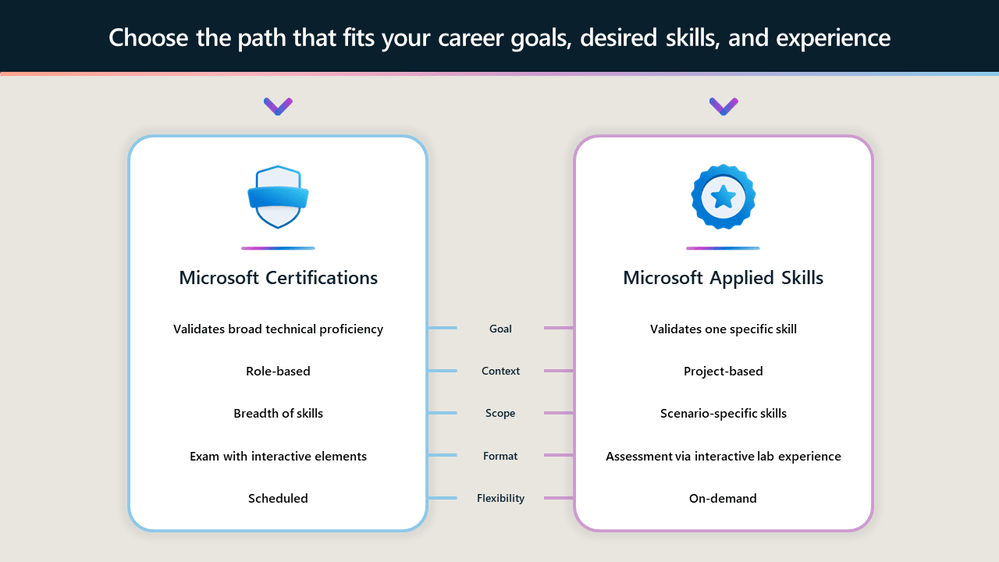
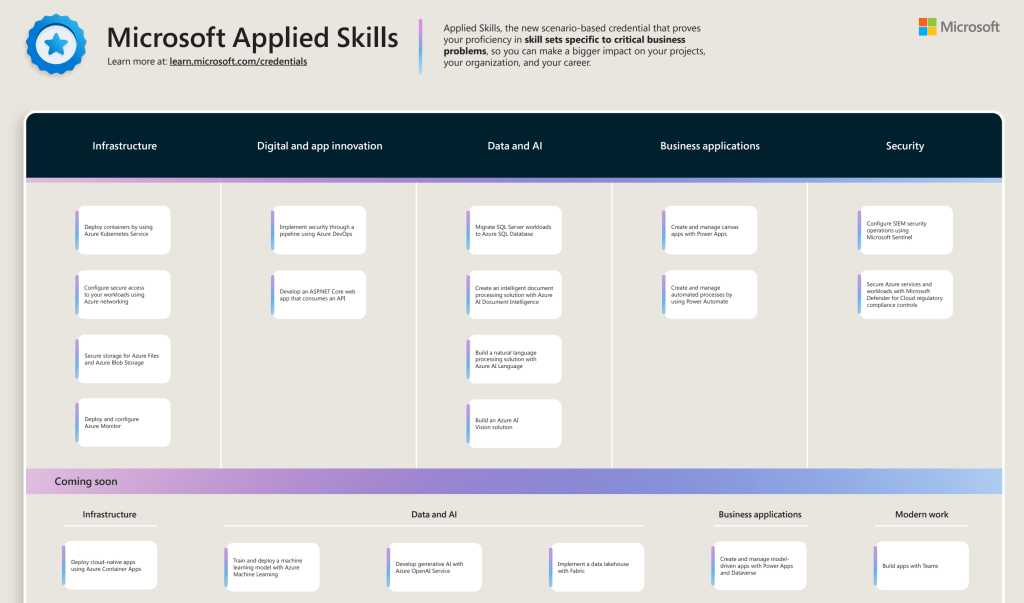
At launch there were several Applied Skills to achieve, at Ignite last week, several more were added, and there are more to come. The below is the current poster advertising what’s possible across pillars
Let’s start with some simple advice – When I first saw this launch, I was excited and clicked through to the secure networking skill (#AzNet all the way people) using my phone, while sitting on my couch. This loaded the assessment window and launched the lab – of which I could see nothing. The screen is far too small to function, and I really wasn’t paying proper attention. However, even without doing anything and simply exiting, it counted as an attempt, and I couldn’t retry for 72 hours. Don’t repeat my mistake, use a computer!

Ok, the assessment/lab itself – I liked it. In fact, I don’t think I could fault it. It loaded quickly, instructions are clear, results are immediate. My only gripe to date is that the results aren’t detailed enough. I was a few points shy of perfect for the secure networking skill (when I sat it properly 🙂 ) and the results are all green ticks, so I have no idea which element was incorrect, or if I missed something. Once loaded, you have a full two hours to complete the assessment, which may seem like a lot, but not if you’re not prepared. I’ve sat several of these now, and what you are being asked to do ranges from simple configuration tick boxes, to complex, layered implementation. The complex tasks ask for a simple result, you need to know how to get there. Without experience, you will struggle to figure this out via Google within your time window, so do the prep work! I found this out personally when I had to figure out some Python for the Document Intelligence assessment, but thankfully I still passed.

As someone who sees great value in having these available, free, to everyone, I think this is an excellent addition to Microsoft Learn. I’ve sat and passed four so far, and intend to continue with the areas I already know and expand into those that I don’t. I also intend to continue to sit new exams and renew all of my Certifications as well. One thing with Microsoft, and specifically Azure – never stop learning!
How to – Share your Certification from Microsoft Learn

Update: As flagged by my friend Dwayne Natwick, online verifiable certifications only appear to be available when renewed or newly passed from July 1st. Older certs will still be active via Credly.
Looks like more of the historic certs are now available as online verifiable. My entire role based cert collection, regardless of upcoming renewal are now available.

Recently, Microsoft announced that they were moving on from Credly. Which personally I thought was a shame, as so many providers use the service, and a regular business can also sign up too meaning everything was in one place.

However, my guess here is the cost was outweighing the benefit for a service they could deliver themselves at scale. So, here we are.

Here is Microsoft’s piece on your current Credly setup:

Microsoft is introducing new features to the Microsoft Learn profile, providing learners with more flexible options for viewing and sharing their Microsoft Certifications directly from Microsoft Learn. With this feature release, Credly badge services will no longer be used for most Microsoft Certifications. All your new and previously earned Microsoft Certifications will automatically be associated with your Learn profile. Once you’ve connected your Microsoft certification profile to your Learn Profile, you can view and share all of your Microsoft Certifications from your Learn profile. Microsoft Certifications earned and claimed on Credly before June 30, 2023, will be available for viewing and sharing through Credly until June 30, 2024. However, your Microsoft Certifications on Credly will no longer be kept current or updated as you pass renewal exams or earn new Microsoft Certifications. The only exception is Microsoft Certifications issued by Certiport which will still be managed and updated on Credly indefinitely.

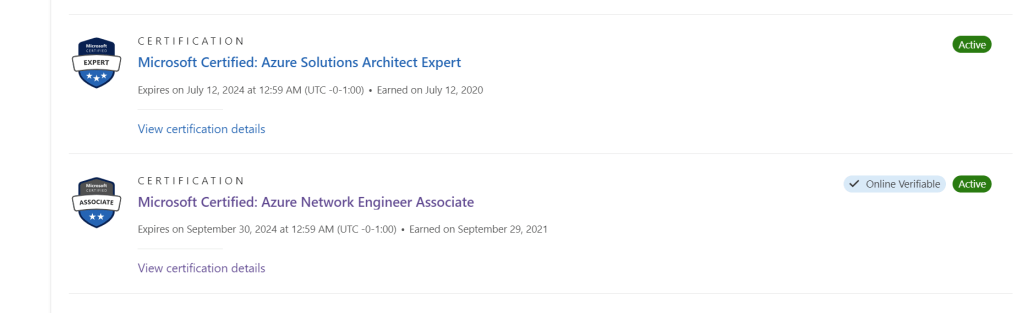
So, if you take a renewal, or exam that earns a certification from July 2023 onwards, you will be able to share it from Microsoft Learn, rather than it being claimed in Credly. I was very curious about this, so I went and renewed my Azure Network certification a few days ago. And thankfully, nothing about that process was any different.

Once passed, again everything appears the same

However, if I click on the ‘view all’ Certifications link, this cert now shows as ‘Online Verifiable’. See below in comparison to another.

If I click on the ‘View certification details’ link just below the cert title, it brings me to a new page with my verified credential.

The ‘Share’ link on the top right hand corner then allows me to choose from several options that link to this verifiable credential anonymously.

The whole process appears to just work to be honest! Here is the link to my cert for reference –

Microsoft Certified: Azure Network Engineer Associate

Learn have a FAQ page that also may help!

Thanks for reading, and as always if there are any questions just ping me!

AZ-302: Microsoft Azure Solutions Architect Certification Transition Study Guide

NOTE: This exam is now retired. I now have guides for AZ-300 and AZ-301.

The first thing to note about this exam is that it is intended only for those who have previously sat and passed the 70-535: Architecting Microsoft Azure Solutions exam. So if you’ve passed that exam, read on!

Next thing to note, this exam isn’t here to stay. It’s a transition exam to earn the more up to date certification. As such, Microsoft are retiring it on June 30, 2019.

What’s great is that if you pass, you will earn the Microsoft Certified: Azure Solutions Architect Expert with just the one exam.

Here is what Microsoft have to say about this exam:

The transition exam is intended for people who have already demonstrated skills in the content domain by passing the existing exam(s) that the new role-based certification exams will be replacing. They cover the delta between the current certification and what we expect people who earn the new certification to be able to do. We don’t want to retest people on the same content where they have already demonstrated competence by passing the existing exam.

Transition exams cover net new content, content that wasn’t covered in enough depth, and content on aspects of the technology that have likely changed since someone took the exam. As a result, the transition exam is not shorter than a typical exam but more focused on the key tasks and skills that were not assessed in the existing exam or certification that is being replaced.

Candidates for this exam are Azure Solution Architects who advise stakeholders and translates business requirements into secure, scalable, and reliable solutions.

Candidates should have advanced experience and knowledge across various aspects of IT operations, including networking, virtualization, identity, security, business continuity, disaster recovery, data management, budgeting, and governance. This role requires managing how decisions in each area affects an overall solution.

Candidates must be proficient in Azure administration, Azure development, and DevOps, and have expert-level skills in at least one of those domains.

Below I’ve put together a collection of links relevant to the sections highlighted as being part of the skills measured for this exam. As always, these are only guide links, sometimes you need to explore a topic much more deeply if you are not familiar with it.

One final important note, as this is a solution architecture exam, there is a presumption that you are aware of service SLAs, performance tiers, dependencies etc. This sort of knowledge will only come with experience and practise. Again, you would have needed to know these to pass 70-535 so nothing new there!

If you spot something, or have a better link for a topic, get in touch! I will update this post regularly as I work my way towards taking this exam and appreciate any feedback.

Determine workload requirements

Determine feasibility and refine requirements

  • There are no real links that help with this section as it is so broad. This requires that prior over-arching knowledge of the platform I mentioned earlier.

Optimize consumption strategy

Design for identity and security

Design authorization

Design a business continuity strategy

Design a site recovery strategy

Design for high availability

Implement workloads and security

Configure serverless computing

Implement authentication and secure data

Implement secure data solutions

Develop for the cloud

Develop long-running tasks

Configure a message-based integration architecture

Develop for asynchronous processing

Develop for autoscaling

Implement distributed transactions

Develop advanced cloud workloads

**This section is vast. A lot of practise and reading required**

https://docs.microsoft.com/en-us/azure/cognitive-services/computer-vision/home

https://docs.microsoft.com/en-us/azure/cognitive-services/speech-service/overview

https://docs.microsoft.com/en-us/azure/bot-service/bot-builder-tutorial-basic-deploy?view=azure-bot-service-4.0&tabs=csharp

https://docs.microsoft.com/en-us/azure/machine-learning/service/samples-notebooks

https://docs.microsoft.com/en-us/azure/iot-fundamentals/iot-services-and-technologies

Azure Certification Updates and Announcing Microsoft Learn

We’re lucky enough to be at Microsoft Ignite in Orlando this week. Trying to wrap all of the announcements into immediate reactions is almost impossible, so I’m going to take some time to give each announcement the detail it deserves. With that said, I think the best place to start is with learning and certification.

At Inspire, Microsoft announced new learning paths for Azure, see here for previous post. Yesterday, they confirmed the new certification options. Microsoft have shifted their certification focus to be role based. This was first seen with Azure Administrator certification and is continued with Developer and Architect tracks. Azure is the first technology platform Microsoft are making this change for, 365 will follow later this year.

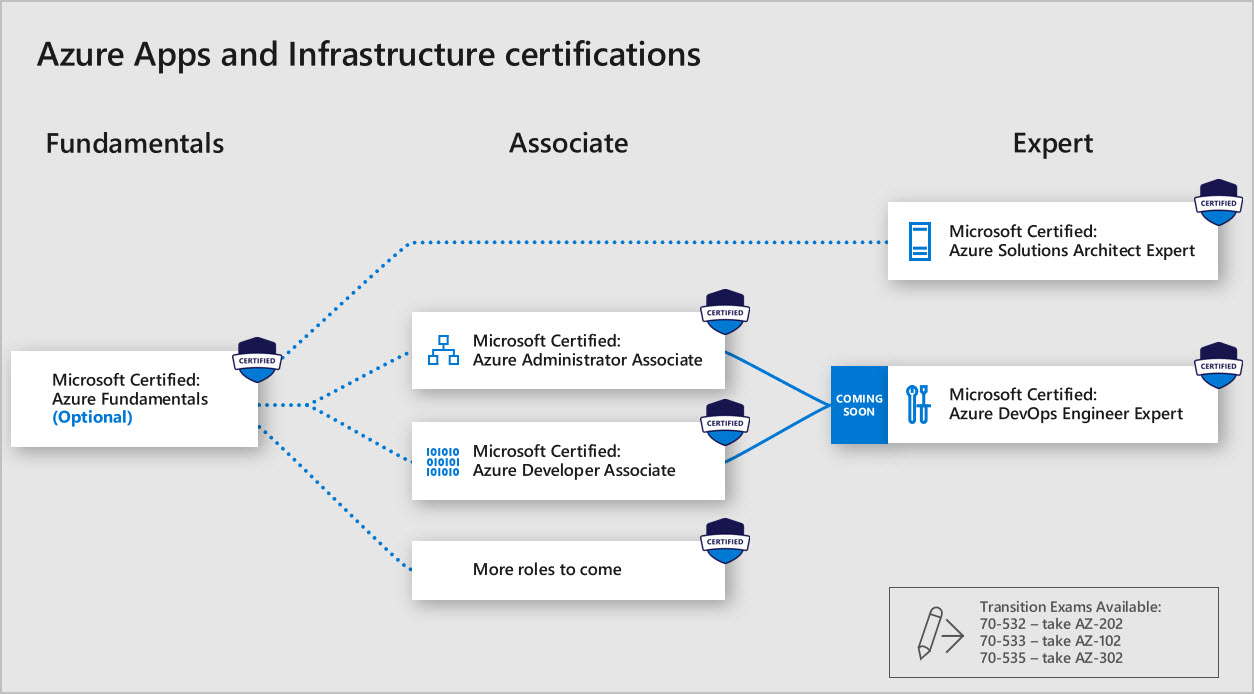
One interesting point to take from the announcement is that there will no longer be an MCSA or MCSE qualification, there will be individual awards for each path. This is best explained in the diagram below:

Azure Apps and Infrastructure certs

So depending on your specific, or hopeful future, job role you have some options. As you can see in the bottom right hand corner, there are Transition exams available if you have previously sat the relevant Azure exams. I’ve already sat the AZ-102 beta exam, it was very good, everything you would expect from an Administrator perspective. I am going to attempt to sit the AZ-302 exam here at Ignite as well, so watch social for thoughts on that if there are no NDAs.

The second and more impressive announcement is the introduction of Microsoft Learn. This is an entirely new platform that allows you to interactively learn right in the browser. Want to know the best thing, it’s all FREE.

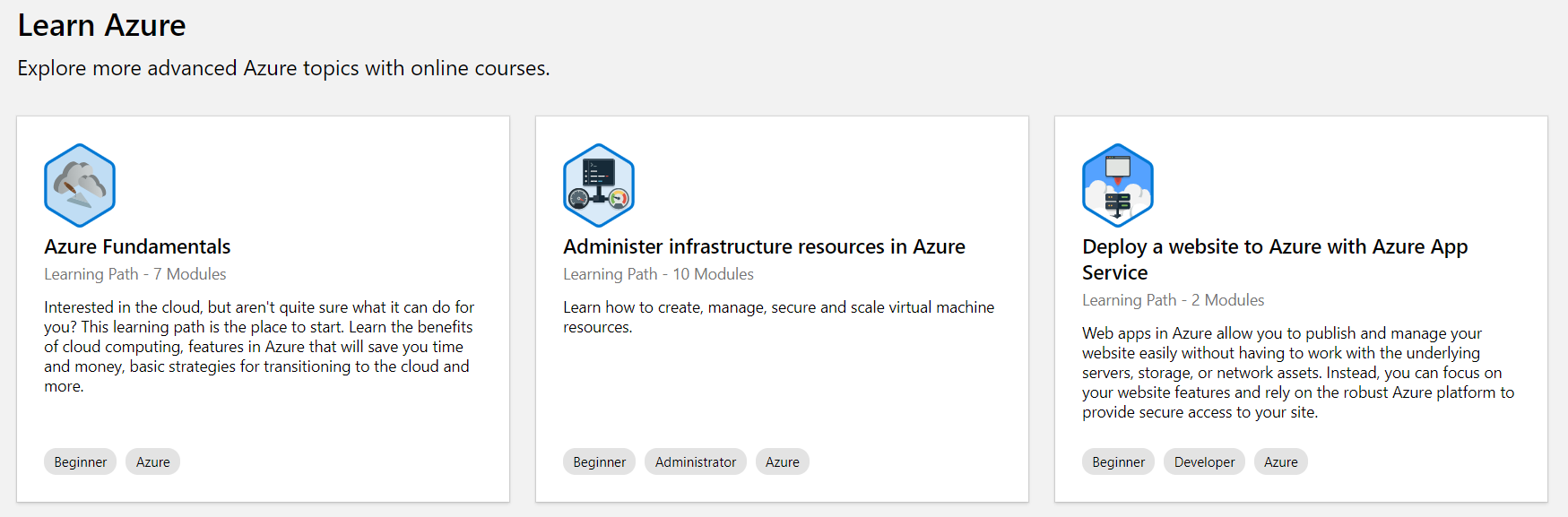
If you’re trying to learn more about Azure, or you are just starting, there is an absolute wealth of learning available. The paths are accurate and beneficial, they allow you to learn at your own pace and if you’re into achievements, they offer plenty! See below for an example of some of the paths offered:

learn azure.PNG

Part of the brilliance of the platform is direct cloud shell integration, allowing you to actually deploy and test what you are learning about, again right in the browser. Genuinely, I am loving this new Learn platform, I spent some time yesterday speaking to the product team and trying out different paths myself and the service is excellent. What are you waiting for, get over there and start learning now!

There are discount codes for the beta exams Architect track here and the Developer track here.