Azure Certification Updates and Announcing Microsoft Learn

We’re lucky enough to be at Microsoft Ignite in Orlando this week. Trying to wrap all of the announcements into immediate reactions is almost impossible, so I’m going to take some time to give each announcement the detail it deserves. With that said, I think the best place to start is with learning and certification.

At Inspire, Microsoft announced new learning paths for Azure, see here for previous post. Yesterday, they confirmed the new certification options. Microsoft have shifted their certification focus to be role based. This was first seen with Azure Administrator certification and is continued with Developer and Architect tracks. Azure is the first technology platform Microsoft are making this change for, 365 will follow later this year.

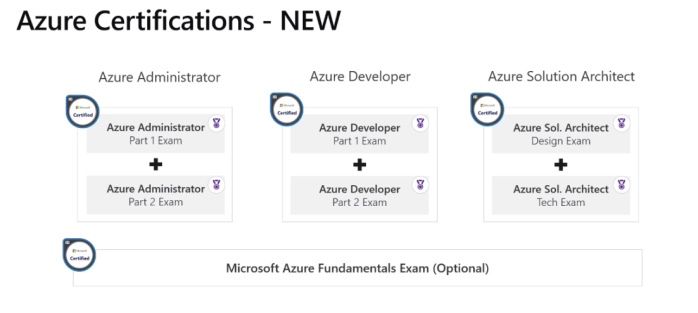
One interesting point to take from the announcement is that there will no longer be an MCSA or MCSE qualification, there will be individual awards for each path. This is best explained in the diagram below:

Azure Apps and Infrastructure certs

So depending on your specific, or hopeful future, job role you have some options. As you can see in the bottom right hand corner, there are Transition exams available if you have previously sat the relevant Azure exams. I’ve already sat the AZ-102 beta exam, it was very good, everything you would expect from an Administrator perspective. I am going to attempt to sit the AZ-302 exam here at Ignite as well, so watch social for thoughts on that if there are no NDAs.

The second and more impressive announcement is the introduction of Microsoft Learn. This is an entirely new platform that allows you to interactively learn right in the browser. Want to know the best thing, it’s all FREE.

If you’re trying to learn more about Azure, or you are just starting, there is an absolute wealth of learning available. The paths are accurate and beneficial, they allow you to learn at your own pace and if you’re into achievements, they offer plenty! See below for an example of some of the paths offered:
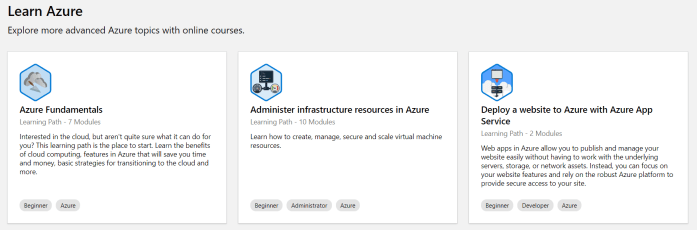
learn azure.PNG

Part of the brilliance of the platform is direct cloud shell integration, allowing you to actually deploy and test what you are learning about, again right in the browser. Genuinely, I am loving this new Learn platform, I spent some time yesterday speaking to the product team and trying out different paths myself and the service is excellent. What are you waiting for, get over there and start learning now!

There are discount codes for the beta exams Architect track here and the Developer track here.

Understanding Azure Reserved Virtual Machine Instances

One of the main benefits of Azure’s billing model is that it offers per minute billing. This means that if you have an application/service/environment that isn’t required 24/7 you can reduce your costs by using Automation so that you will only pay for what you consume.

However, if your environment requires you run a VM constantly, the cost can start to mount up. To help alleviate this, Microsoft offer a solution in the form of long-term fixed price Virtual Machine instances.

These Reserved Instances (RI) help save money by allowing you to pre-pay for a one-year or three-year VM size. The fact that you pay up front, allows you to make significant savings on the Pay-As-You-Go pricing.

RIexample

The most common subscription offers have the ability to purchase RIs, but there are some restrictions in terms of how it is approached. The options are the below:

  • Enterprise agreement subscriptions. To purchase reservations in an enterprise enrollment, the enterprise administrator must enable reservation purchases in the EA portal.
  • Pay-As-You-Go but you must have the โ€œOwnerโ€ role on the subscription to buy a reservation.
  • Cloud Solution Provider subscriptions. However, the providing partner must make the purchase on behalf of the customer.

Once purchased, the discount is then applied to the resource usage that matches up with the RI capacity purchased. For example, if you purchase a one-year RI for a DS4v3 size VM, and you are using a DS4v3 the discount will apply against that usage.

A good strategy is to determine the sizing before purchasing the RI. So my advice would be to run your VMs without an RI for a few months to ensure your sizing is suitable and therefore correct. However, if this is something that is proving difficult, there is a range of flexibility offered within your RI scope.

With instance size flexibility, you donโ€™t have to deploy the exact same VM size to get the benefit of your purchased Azure Reserved Instances (RI) as other VM sizes within the same VM group also get the RI discount. As a rough example, see the below table from the Microsoft announcement.

VM name VM group Ratios

Standard_D2s_v3

DSv3 Series

1

Standard_D4s_v3

DSv3 Series

2

Standard_D8s_v3

DSv3 Series

4

Standard_D16s_v3

DSv3 Series

8

Standard_D32s_v3

DSv3 Series

16

Standard_D64s_v3

DSv3 Series

32

This means that if you buy an RI for a D2sV3, it would cover half of an D4sV3 instance etc. More on how this can be applied and options available to you are here.

In general, I think an RI purchase is something that most deployments should be taking advantage of. Once sized correctly and with the ability to leverage flexibility, there are huge savings to be made with relatively low amounts of administrative effort.

More on how to buy an RI here

More on how the discount is applied here


Azure App Service and Windows Containers

Containerisation of applications is something that is becoming more and more common. Allowing developers to “wrap” all requirements into an individual element which the infrastructure team can then deploy where resources are available opens a door to the most modern options in application deployment and management.

Enter Azure App Service, which for years now has been removing the need for an infrastructure management layer and allowing teams to focus on deployment and performance. Traditionally, you had to deploy your apps within the allowed parameters of your App Service Plan (ASP). However, you can now run containers as part of this platform.

Combine this with a Container Registry, such as Azure Container Registry and you can deploy images within minutes. These images can then be scaled within your ASP to meet demand and can be updated as required using your current CI/CD processes.

This had been limited to Linux based containers, but Microsoft have recently announced a public preview of the ability to run Windows containers within your ASP. This is targeted towards customers interested in migrating .NET applications to Azure, and hoping to avail of a PaaS service to get the many productivity benefits such as high availability within and across Azure regions. This can also increase application redundancy options by using integrated backup/restore and app cloning options.

WebAppForContainers
Example deployment scenario

The preview capabilities are appropriate for testing and POC environments, but there are of course some limitations and preview deployments are not recommended for production workloads in any scenario.

Within the preview the following is supported:

  • Deploy containerized applications using Docker Hub, Azure Container Registry, or private registries.
  • Incrementally deploy apps into production with deployment slots and slot swaps.
  • Scale out automatically with auto-scale.
  • Enable application logs and use the App Service Log Streaming feature to see logs from your application.
  • Use PowerShell and Win-RM to remotely connect directly into your containers.

For a quick start/how-to see the following link.

First Impressions – Azure Firewall Preview

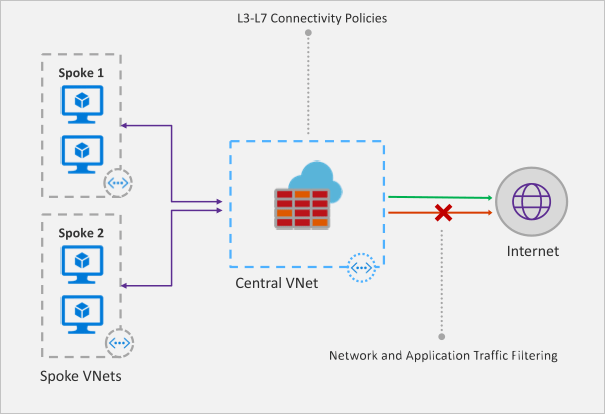
Recently Microsoft announced that a new Azure Firewall service was entering a managed public preview. Azure Firewall is a managed, network security service that protects your Azure Virtual Network resources. It is a fully stateful firewall as a service with built-in high availability and scalability.

firewall-overview.png

The services uses a static public IP meaning that your outbound traffic can be identified by third party services as/if required. Worth nothing, that only outbound rules are active within this preview. Inbound filtering will hopefully be available by GA.

The following capabilities are all available as part of the preview:

  • Stateful firewall as a Service
  • Built-in high availability with unrestricted cloud scalability
  • FQDN filtering
  • Network traffic filtering rules
  • Outbound SNAT support
  • Centrally create, enforce, and log application and network connectivity policies across Azure subscriptions and VNETs
  • Fully integrated with Azure Monitor for logging and analytics

As with all previews it should not be used for production environments, but for testing purposes this is how to register your tenant for deployment.

To enable the Azure Firewall public preview follow the guide here: Enabling the preview

Once enabled, follow this tutorial for a sample implementation: Deployment Tutorial

Now that you’re familiar with the deployment, you should apply to your specific test scenarios. Be wary of some operations that could be limited by applying a default route to your VM. There is an updated FAQ for the service here: Azure Firewall FAQ

Overall, this is a welcome addition to Azure networking. As the preview progresses and more service options are added, especially inbound options, I see this being as common as deploying an NSG in your environment. Combining it with peering and the right set of rule collections for your environment allows for an easily managed, scalable, and most importantly, secure environment within Azure with minimal cost and infrastructure footprint.

New Azure Certifications

As many of you are probably aware, there is already a Microsoft certification path for those looking for Azure skill set recognition. Recently at the Microsoft Inspire partner conference, Microsoft announced that this would be replaced.

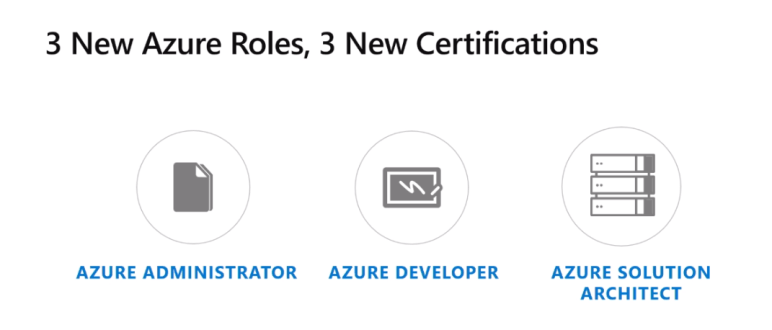
There will now be three roles defined with new qualification to earn.

  1. Azure Adminitstrator
  2. Azure Developer
  3. Azure Solutions Architect

new certs

These new roles and certifications are an attempt to better line-up with industry demands and standards.

overall certs

As with most current MCSA qualifications, it will take two exams to earn a certification. The Beta exams for Azure Administrator are live right now. AZ100 and AZ101 test a broad range of skills across the Azure sphere including, Compute, Networking, Identity, Storage among others.

If you already have the previous exam, 70-533, you can take a transition exam to earn an Azure Administrator certification – AZ102. Again, this is in Beta so places are limited.

timeline

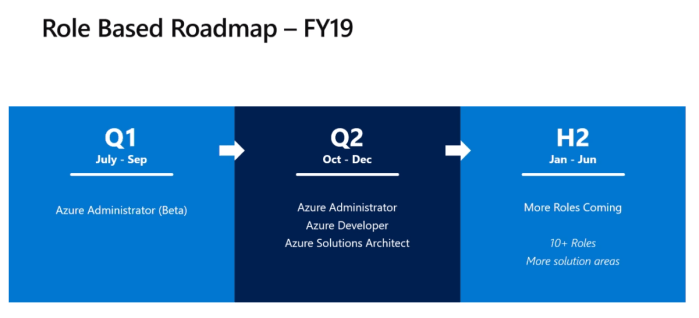
The time frame for the remaining roles and certifications was also shown, so expect a follow-up post on this later this year.

Also, thanks to Microsoft MVP Thomas Maurer, here is a link to discount codes should you wish to book any of the Beta exams. The link is the Microsoft Learning blog, so I will paste it here in full in case anyone is worried about dodgy code pages! ๐Ÿ™‚

https://www.microsoft.com/en-us/learning/community-blog-post.aspx?BlogId=8&Id=375147

If you would like to watch the announcement in full, you can do so here – https://myinspire.microsoft.com/videos/fb7c3db2-1c65-4a69-aceb-fd06c19bf971