Where to Start – NLP with Azure OpenAI

I think without a doubt, one of the most talked about subjects at the moment is AI. Mass usage of OpenAI’s ChatGPT service exploded onto the scene this year, and we haven’t looked back. However, starting at such a broad scale of possibilities can be daunting. This post aims to simplify things down a bit, by looking at one single use case.

In this instance, I am going to take the Natural Language Processing capability offered by Azure OpenAI and have a GPT model summarise a piece of text for me. I completed sample lab files for this as part of a Microsoft Learn course, and I am reusing the Python here with some tweaks of mine!

All of the code for this solution is on Github here – https://github.com/wedoazure/sumo

The idea is that we take a text file, in my code I am using the first chapter from ‘Sherlock Holmes – The Hound of the Baskervilles’, but feel free to use whatever txt file you like, and send it to Azure OpenAI and ask for it to be summarised.

The app itself is command line based, very simple. It reads your text file, then sends a chat completion prompt to the Open AI model asking it to summarise your text.

The model then responds with a fixed length summary based on your input of word count and temperature.

The ability to adjust both is something I have added as my little variation. I had a couple of reasons for changing this up, but mostly built on the fact that your opinion of the output is important. For an example, read the actual text you want summarised, then have the app do it. Is the summary accurate? Is it a bit short, is it a bit too stiff? Change things up! Here is a 50 word summary at a temp of 0.5 versus 0.9 for the same txt file.

Sherlock Holmes and Dr. Watson examine a visitor’s stick, deducing that its owner is a country practitioner who walks a lot and has likely received a presentation from a hospital. The visitor, Dr. James Mortimer, arrives and confirms their deductions. He seeks Holmes’ assistance with a serious and extraordinary problem.

50 words at 0.5 temp

Dr. James Mortimer visits Sherlock Holmes and asks for his assistance with a mysterious problem. Through analyzing a stick left by a previous visitor, Holmes deduces that Dr. Mortimer is a country practitioner who used to work at Charing Cross Hospital. Dr. Mortimer confirms this and reveals that he has a strange case involving the curse of the Baskervilles.

50 words at 0.9 temp

As you can see, these are very different outputs, I personally prefer the response at 0.9, as I am summarising a work of fiction. However, if it was a financial report, you may need a lot less creativity and therefore force a lower temp. Similarly, you may want more words, or less, depending on your scope.

And that’s it! Short and sweet, using a single use case, minimal effort but impactful and useful outcome. I am sure I may make more tweaks, adding more advanced file input is definitely on the list. Let me know if you have any questions!
How to – Share your Certification from Microsoft Learn

Update: As flagged by my friend Dwayne Natwick, online verifiable certifications only appear to be available when renewed or newly passed from July 1st. Older certs will still be active via Credly.
Looks like more of the historic certs are now available as online verifiable. My entire role based cert collection, regardless of upcoming renewal are now available.

Recently, Microsoft announced that they were moving on from Credly. Which personally I thought was a shame, as so many providers use the service, and a regular business can also sign up too meaning everything was in one place.

However, my guess here is the cost was outweighing the benefit for a service they could deliver themselves at scale. So, here we are.

Here is Microsoft’s piece on your current Credly setup:

Microsoft is introducing new features to the Microsoft Learn profile, providing learners with more flexible options for viewing and sharing their Microsoft Certifications directly from Microsoft Learn. With this feature release, Credly badge services will no longer be used for most Microsoft Certifications. All your new and previously earned Microsoft Certifications will automatically be associated with your Learn profile. Once you’ve connected your Microsoft certification profile to your Learn Profile, you can view and share all of your Microsoft Certifications from your Learn profile. Microsoft Certifications earned and claimed on Credly before June 30, 2023, will be available for viewing and sharing through Credly until June 30, 2024. However, your Microsoft Certifications on Credly will no longer be kept current or updated as you pass renewal exams or earn new Microsoft Certifications. The only exception is Microsoft Certifications issued by Certiport which will still be managed and updated on Credly indefinitely.

So, if you take a renewal, or exam that earns a certification from July 2023 onwards, you will be able to share it from Microsoft Learn, rather than it being claimed in Credly. I was very curious about this, so I went and renewed my Azure Network certification a few days ago. And thankfully, nothing about that process was any different.

Once passed, again everything appears the same

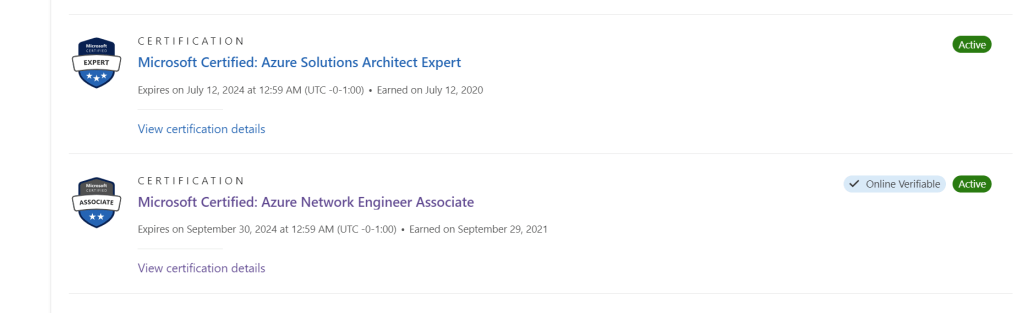
However, if I click on the ‘view all’ Certifications link, this cert now shows as ‘Online Verifiable’. See below in comparison to another.

If I click on the ‘View certification details’ link just below the cert title, it brings me to a new page with my verified credential.

The ‘Share’ link on the top right hand corner then allows me to choose from several options that link to this verifiable credential anonymously.

The whole process appears to just work to be honest! Here is the link to my cert for reference –

Microsoft Certified: Azure Network Engineer Associate

Learn have a FAQ page that also may help!

Thanks for reading, and as always if there are any questions just ping me!

Opinion – I’m sold on AI

For the first time in a while, I’m writing just about my thoughts on a topic, rather than specifics. As a result, this will be categorised differently, and maybe I will continue it as a series…

It is hard to spend a single moment of a day at the moment without AI popping up. Social media is alight with opinions, dos and don’ts, hype and Skynet fear. I’m going to start by saying – I think that’s important.

If you spend some time looking at the capabilities that modern AI can offer, you quickly realise that this isn’t a fad. This is something that is coming at us like a train, and is here to stay. That certainty is why I think a mix of opinions is important. Experts on the subject are openly saying they are unsure where this can, will, or should go. That is both exciting and terrifying.

Rather than focus on the terrifying (I personally don’t think it will get there FWIW), I want to focus on the exciting. Recently I’ve seen some use cases, and some demos that have convinced me that this will make my work life better. While I haven’t seen something yet that helps my personal life directly, perhaps AI helping work can indirectly give me a better balance of time.

Also, I currently have zero interest in the creative side. Art, music, even blog posts are something I have no care for seeing AI involved with.

Part of my job requires me to explain complex technology to people in simple language. I have spent some time trying to think how could I explain AI in this way. I think simply stating it’s a new assistant is more confusing than helpful. “I don’t want or need another Siri”. I also think getting to deep on LLMs etc helps no one. I’ve simply settled on AI is an enabler for a new generation of your productivity tool.

In the same vein that an abacus helped you count, and a calculator was a leap forward, AI will be the tech that facilitates a leap forward for your tool.

Let’s take Excel as an example. It’s not a core tool of mine, but I use it a lot. Mostly to read data, rarely to work with complex sets. However when I do, finding out how to do something is difficult. Excel has been around a long time, there is a huge amount of content, searching and finding what you want always takes longer than a single Google search. Enter AI to boost productivity. This is what I want from it.

Working with VS code and GitHub Copilot creating Bicep templates etc. I’ve seen some of this already, write a comment, get some code. It’s not perfect, and sometimes maybe it’s not even correct and this is important to me and why I am calling AI tech to boost your tool.

I don’t think AI can replace someone. I might be wrong, absolutely. But right now, I see it making people more productive. You still need people to validate and confirm the value of what AI has returned. Regardless of capability, I don’t want AI to find data, edit it, and send it to a client, without me involved. I do want it to do the heavy lifting for me, hopefully helping me hit send quicker and with less mental effort. But that is far enough for now please.

As the title says, I’m sold. As long as modern AI can save me time and do so with a degree of accuracy that ensures I can spend time validating and tweaking rather than correcting work it has done I think this will change how we work forever. It is a very exciting time to be working with this technology.

Microsoft MVP Summit – 2023

As part of the Microsoft MVP program, every year, Microsoft run a specific summit for MVPs only. At this event, MVPs interact with Microsoft teams on NDA content and hang out with peers. Over the last number of years, this has been virtual. However, this year the event was hybrid, with MVPs able to attend at Microsoft HQ in Seattle. It was also a celebration of 30 years of the MVP program!

Thankfully I was able to make the trip! Here I am looking delighted with myself after picking up my badge:

As all details within the event are under the MVP NDA, unfortunately I cannot even share a round-up. However, I can say that I am very excited for Build, which is again hybrid in Seattle. You can register here – https://build.microsoft.com/en-US/home

And finally, if you saw all of the posts from this past week and feel like you may be a fit for the program, let’s have a chat about a nomination!

Exploring – Azure Firewall Basic

Anyone who follows this blog knows that Azure Firewall is a key resource for me in successful Azure deployments. Its combination of ease of deployment and functionality easily outpace alternative vendor choices on Azure. Up until now, we have had a Standard and Premium SKU. The Premium SKU introduced new features to Standard. Now, we have a Basic SKU and several features have been removed. Let’s explore what the Basic SKU offers.

First up, deployment and infrastructure. At it’s core, Basic is the same resource. Meaning it still has built-in HA. However, it is a fixed scale, meaning two instances only. However, Availability Zones are still covered, meaning choices up to 99.99% for SLAs are achievable. Fixed scale does mean a more limited bandwidth capability, Basic has up to 250Mbps in comparison to Standard which is up to 30Gbps. That’s not a typo!

Microsoft call out the fact they are targeting SMB customers with this SKU. But that doesn’t mean that the features of Basic wouldn’t suit an Enterprise spoke, or specific environment requirement where cost vs features work.

So let’s take a look at the features included. The basics are all the same, multiple Public IPs, inbound/outbound NAT etc. (there is a full list here) but some specifics worth calling out are:

  • Network Rules – As Basic does not support DNS Proxy, you can only use standard, non-FQDN rules in Network filtering. More on that for Standard here.
  • Threat Intelligence – While it can be enabled, it can only be used in alert mode. This means you would have to accept this, and/or monitor logs to adjust rules based on alerts.

This means that once you are aware of the functionality and limitations, Basic may be a great choice for your environment. Especially when you consider one of its main benefits – cost. There are two costs associated directly with Azure Firewall:

  • Deployment
  • Data Processing

Deployment wise, Basic is considerably cheaper versus Standard. Deploying to North Europe, Basic should be approximately €266/month in comparison to Standard at circa €843/month.

However, data processing is more expensive on Basic. 1Tb of data processing for Basic, in North Europe will be approximately €62/month, which is quite a bit more than Standard coming in at around €15/month. So this is definitely one to keep an eye on in your environment. There is no reservation or similar choice here, Standard and Premium simply have a lower processing price.

Thankfully, integration with Azure Monitor is unchanged across SKUs, so you can capture all of the data you need.

The experience within portal, or via shell for deployment and management is also unchanged. The portal dynamically calls out what is allowed/functional when using a Basic policy, so confusion is avoided.

In conclusion, I think Basic is a great addition to the AFW family. I would have liked to see DNS Proxy included in the feature set, I see this deployed everywhere now and the Network rule functionality it adds is excellent. I am also interested to see how/if that throughput limit will come into play for specific scenarios.

As always, if there are any questions, please get in touch!